Microsoft Power Automate

Streamline repetitive tasks and business processes

Microsoft Power Automate
People working

How Microsoft Power Automate Helps You Succeed

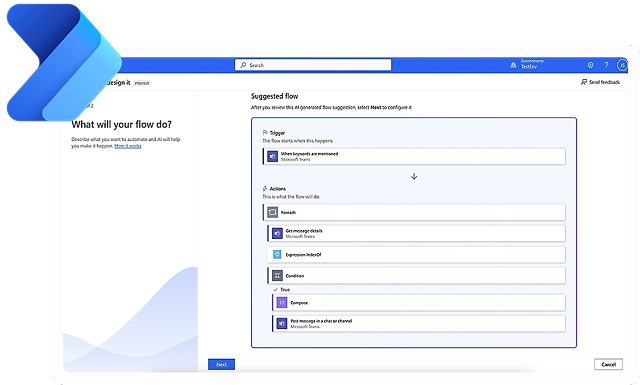
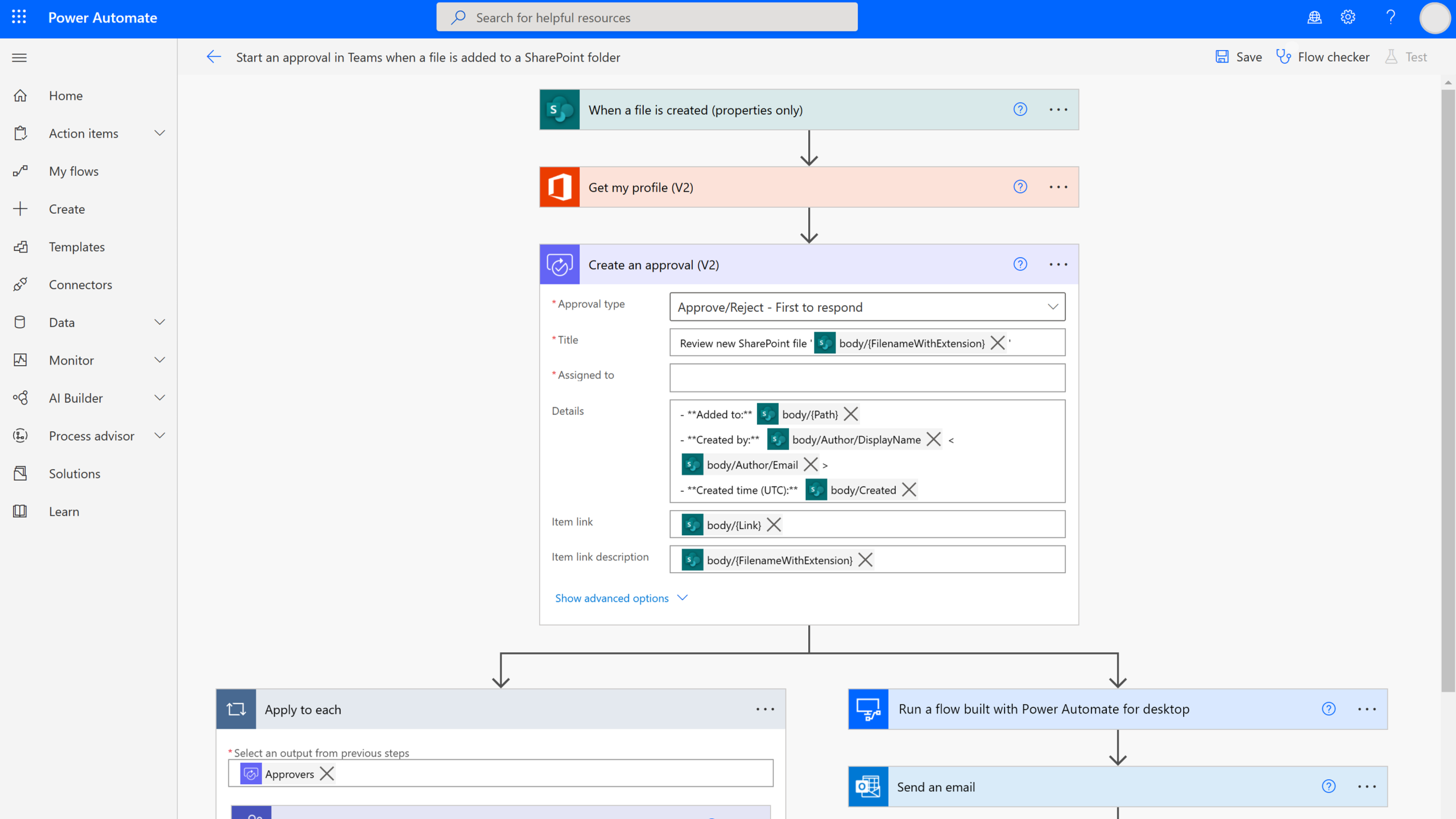
In today’s fast-paced, connected world, automation helps organizations do more with less. From simple tasks to complex processes, it frees teams to add value, reduce errors, and save time. McKinsey reports 60% of jobs have at least 30% of tasks that could be automated. Microsoft Power Automate, part of the Power Platform, enables businesses to streamline manual work with no-code flows across legacy systems and modern cloud apps. 

Microsoft Power Automate with the Power of Generative AI

Intelligent Workflow Automation

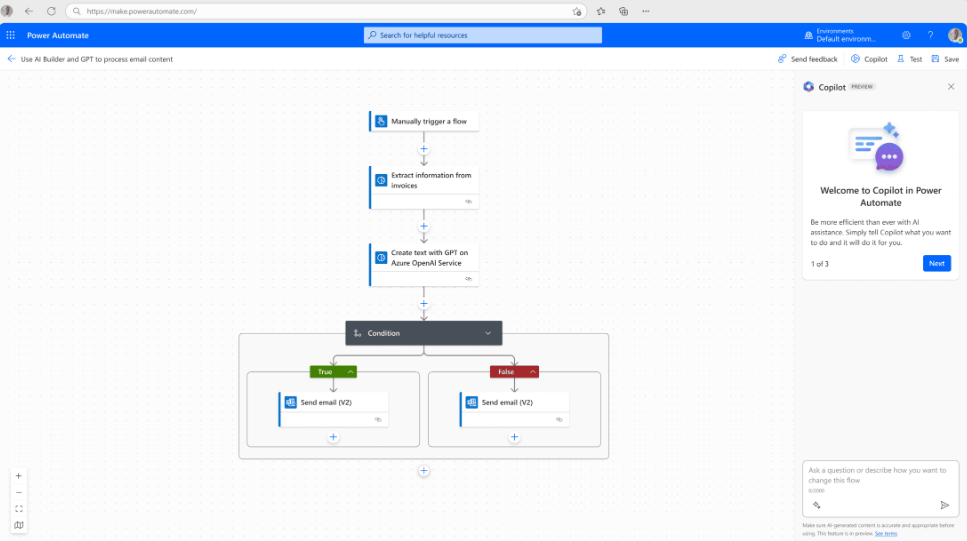
Uses AI Builder to automate document processing, approvals, and data extraction — combining predictive models and decision logic to streamline workflows.

Smart Data Extraction & Processing

Uses AI OCR/ML to read invoices, forms, emails; classifies content, extracts key data, and routes to systems accurately.

Predictive Insights & Recommendations

Delivers AI-driven recommendations and insights within workflows. Identifies patterns, flags anomalies, and suggests actions to improve efficiency and decision-making.

Microsoft Power Automate with the Power of Generative AI

Ready to Build an AI-Ready Workforce?

Prodware helps you implement secure, scalable AI solutions — from Copilots to digital workforce automation — to accelerate your transformation journey.

Benefits

Boost productivity whatever the business issue

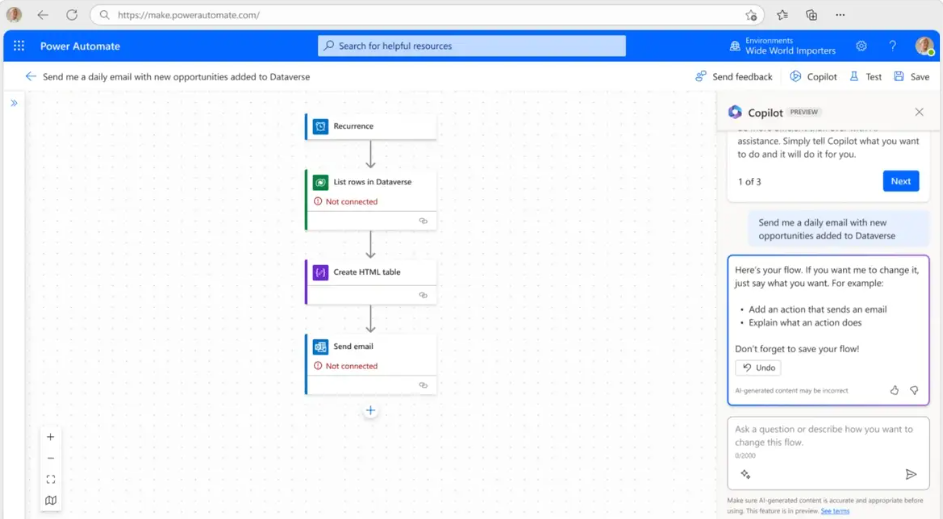
Build time-saving workflows across tasks and systems with 1,000+ connectors — starting from scratch, a template, or with Copilot-assisted automation.

Seamlessly work with your daily business applications

Native experiences in Microsoft 365, such as Microsoft Teams, Excel and SharePoint, help you do more in your favorite apps.

Easy and safe automation for everyone at scale

Enable no-code secure workflow building with cloud DLP, identity & access management. Scale automation with governance and 360° monitoring.

Leverage AI for intelligent workflows

Automate manual tasks with AI, freeing time for strategic work. AI insights help everyone make faster decisions.

Features

Automated Workflows

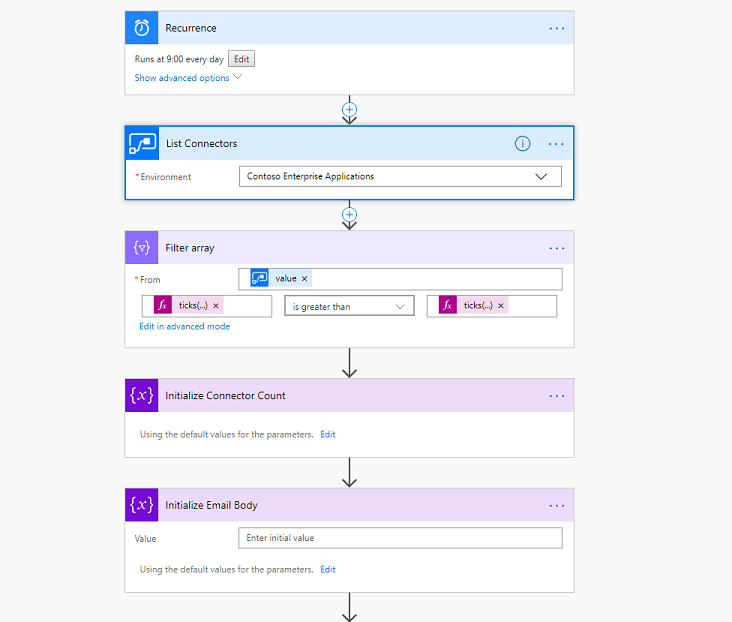
Create cloud or desktop flows that trigger automatically based on events, schedules, or manual actions. Automate approvals, notifications, data synchronization, file processing, and business operations without manual intervention. 

System & App Integration

Connect to 1,000+ Microsoft and third-party applications (SharePoint, Outlook, Teams, Dynamics 365, SAP, Salesforce, SQL, etc.). Enable seamless data exchange and cross-platform process orchestration. 

Robotic Process Automation (RPA)

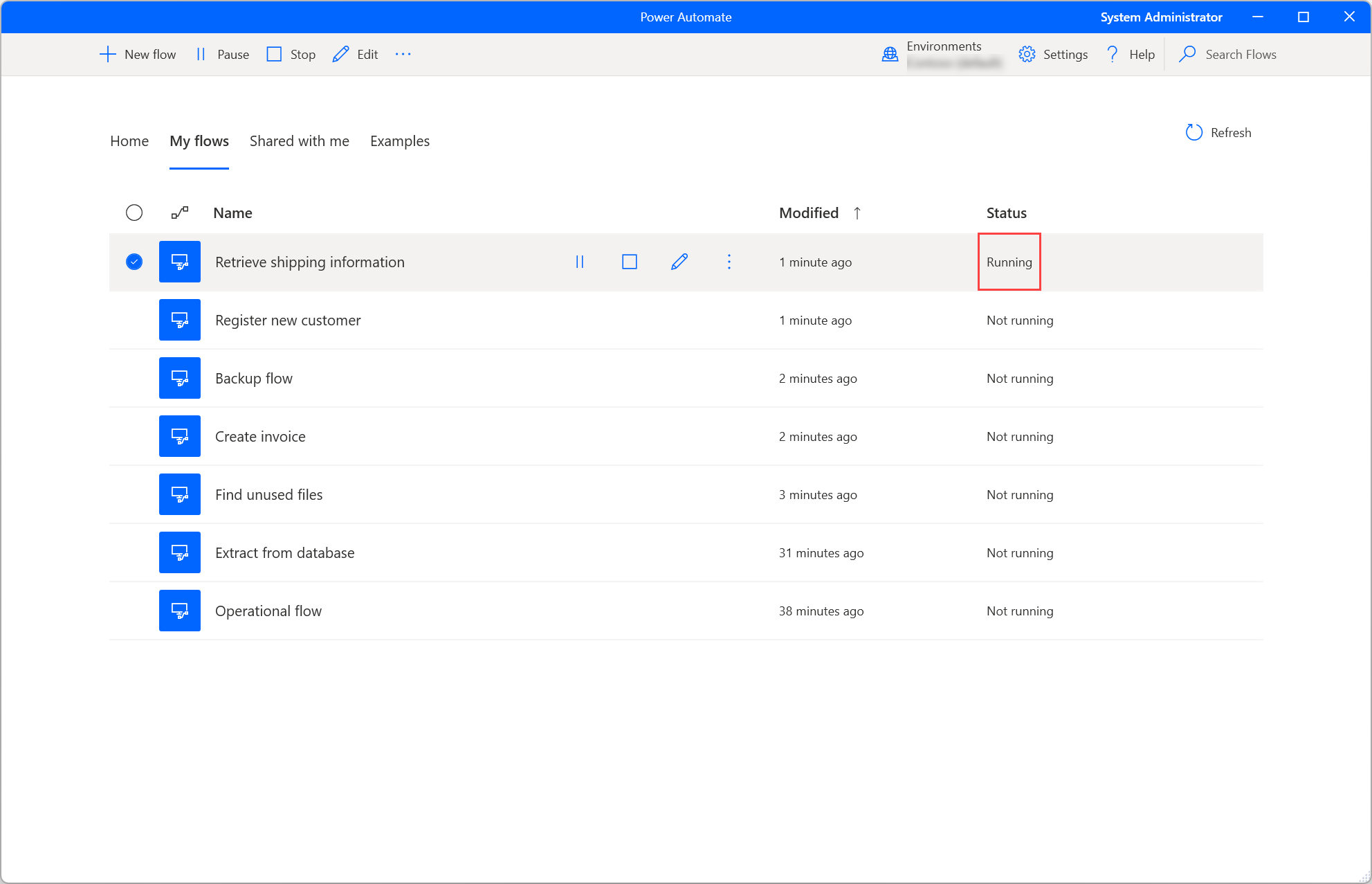
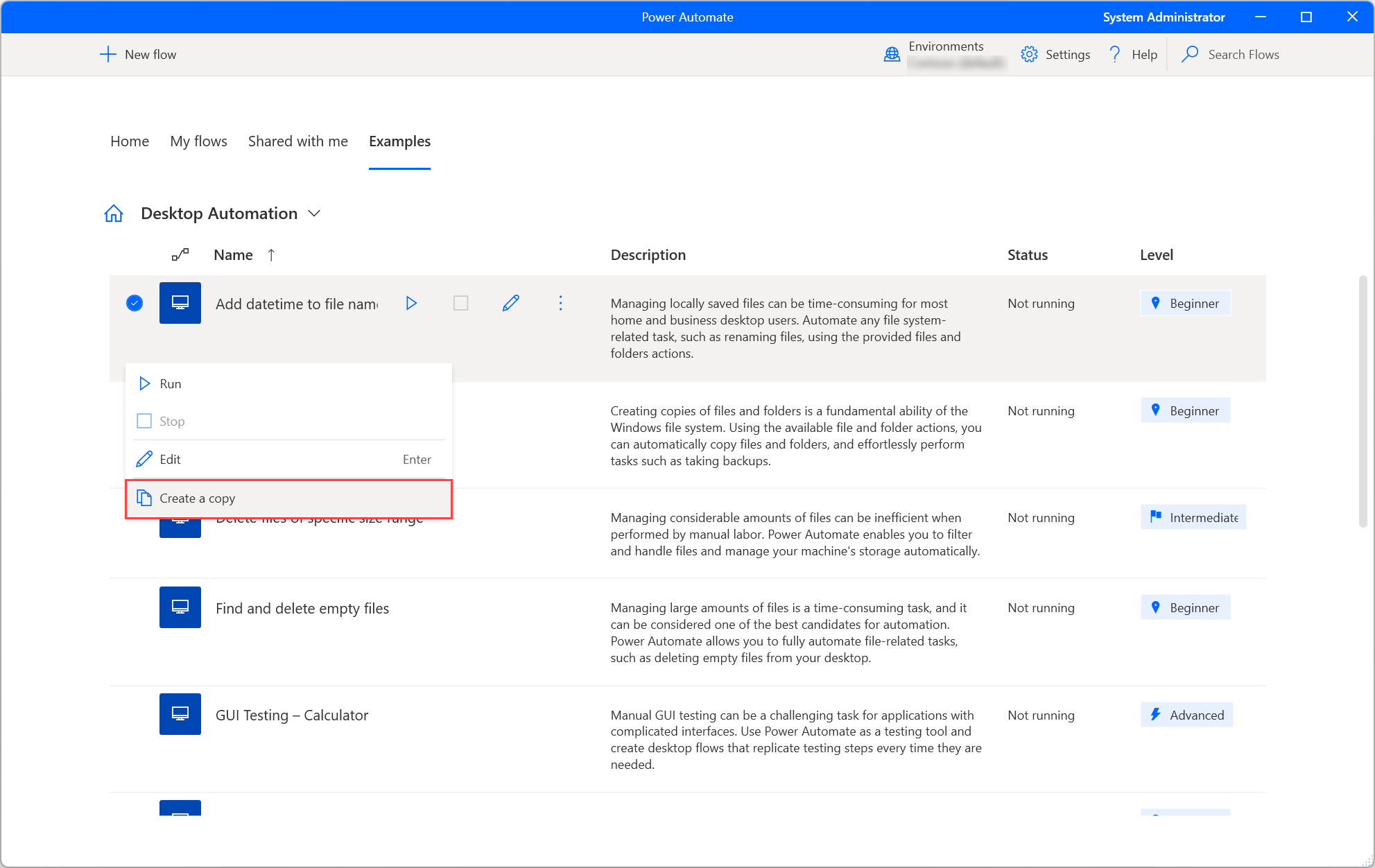
Automate legacy or non-API systems using attended and unattended desktop flows. Interact with UI elements, web pages, and local applications to replicate human actions securely and reliably.

AI & Intelligent Automation

Integrate AI Builder and AI models to process documents, extract data, classify information, and make automated decisions. Combine structured workflows with intelligent data handling.

Approvals & Notifications

Build multi-stage approval processes with dynamic routing, escalation rules, and real-time notifications via Teams, email, or mobile. Track status and maintain full audit history.

Data Processing & Transformation

Capture, validate, transform, and store data across systems. Perform conditional logic, loops, expressions, and error handling to manage complex business logic scenarios.

Governance & Security Controls

Manage environments, user roles, data loss prevention (DLP) policies, and compliance settings. Monitor activity logs and enforce enterprise-grade security standards.

Monitoring & Analytics

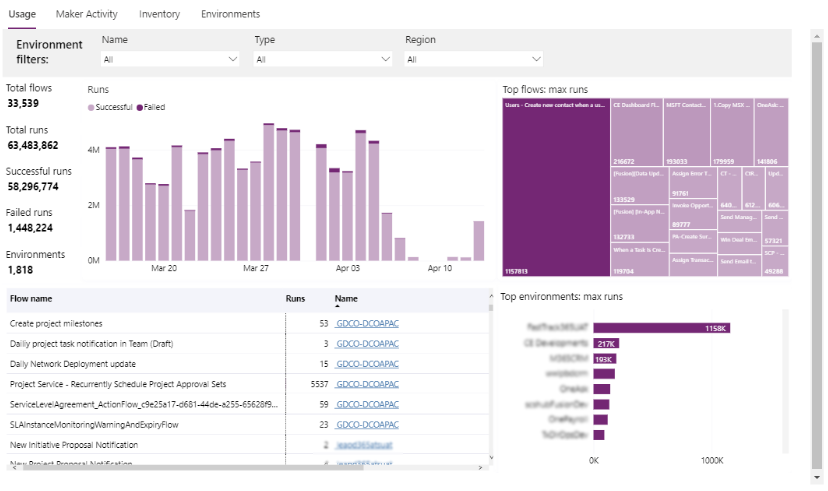
Track flow performance, execution history, failures, and usage metrics through dashboards and logs. Identify bottlenecks and optimize automation reliability.

Industries Where we Deliver Excellence

  • Hospitals & Clinics: Empower decision-making with real-time patient data analytics, operational efficiency insights, and predictive modeling for improved outcomes. 
  • Pharmaceuticals: Streamline clinical trials, monitor drug performance, and analyze supply chain data to accelerate time-to-market.
Healthcare
  • Retail Banking: Gain 360° views of customer behavior, detect fraud patterns, and optimize branch operations with advanced dashboards. 
  • Investment & Asset Management: Monitor portfolio performance, analyze risk, and generate actionable insights for better investment strategies.
Finance & Banking
  • Consumer Analytics: Track purchase trends, segment customers, and personalize marketing campaigns using data-driven insights.
  • Inventory & Supply Chain: Optimize stock levels, forecast demand, and reduce operational costs with predictive analytics. 
Retail & E-Commerce
  • Production & Operations: Improve factory efficiency, monitor equipment performance, and reduce downtime through predictive maintenance dashboards. 
  • Supply Chain Management: Track suppliers, optimize logistics, and gain end-to-end visibility across production lines.
Manufacturing
  • K-12 & Higher Education: Analyze student performance, attendance trends, and resource allocation for better learning outcomes. 
  • Research Institutions: Visualize research data, manage grants, and monitor project progress efficiently.
Education
  • Public Safety & Services: Track crime patterns, allocate resources effectively, and optimize public service delivery. 
  • Policy & Planning: Make data-driven decisions for urban planning, social programs, and budget management.
Government & Public Sector
  • Renewable & Traditional Energy: Monitor energy production, forecast demand, and optimize distribution networks. 
    Water & Waste Management: Track consumption patterns, identify inefficiencies, and improve sustainability initiatives.
Energy & Utilities

FAQ

Power Automate is a workflow automation tool that helps you connect different apps and services to automate repetitive tasks, such as sending notifications, syncing files, or collecting data without manual effort.

No, coding is not required. Power Automate provides a low-code/no-code interface with prebuilt templates and drag-and-drop actions, making it accessible for beginners as well as advanced users.

It integrates with hundreds of apps including Microsoft 365 (like Outlook, Excel, SharePoint), as well as third-party services such as Google Drive, Slack, Twitter, and many business applications through connectors.

Why choose Prodware for Power Automate?

As a certified Microsoft Gold partner with more than 30 years’ experience, we support our customers through their transformation journey, turning market challenges into sustainable growth opportunities.
With our experience across the Power Platform, our experts can support you with practical solutions and services to help you optimize and automate business processes that solve your business issues with no development barriers, no waiting and with full business security and compliance.

Have a project? Let's talk!

Tell us about your project and we’ll show you how Prodware can transform your business.

* Please select one of these options:

Microsoft Power Pages

Create secure, low-code business websites.

Microsoft Power Pages
People working

How Power Pages Helps you Succeed

Now anyone can build low-code business websites for desktop and mobile with a single creation. Part of Microsoft Power Platform, Power Pages lets you design professional sites without coding, speeding time to market at lower cost. Use responsive templates or drag-and-drop components to create corporate, e-commerce, community, or self-service sites. Simple to use yet powerful, it combines agility, flexibility, and professionalism.

Microsoft Power Page with the Power of AI

Intelligent Automation

Automates workflows and repetitive tasks, letting users focus on high-value activities with minimal manual effort.

Smart Recommendations

Offers context-aware suggestions to optimize content, layouts, and user engagement.

Insights & Analytics

Delivers actionable insights with AI-driven data analysis, helping users make informed decisions quickly.


Microsoft Power Page with the Power of AI

Build Your AI-Ready Workforce Today

Prodware empowers you to deploy secure, scalable AI solutions—from smart copilots to digital labor—driving faster, high-impact transformation.

Benefits

SIMPLE

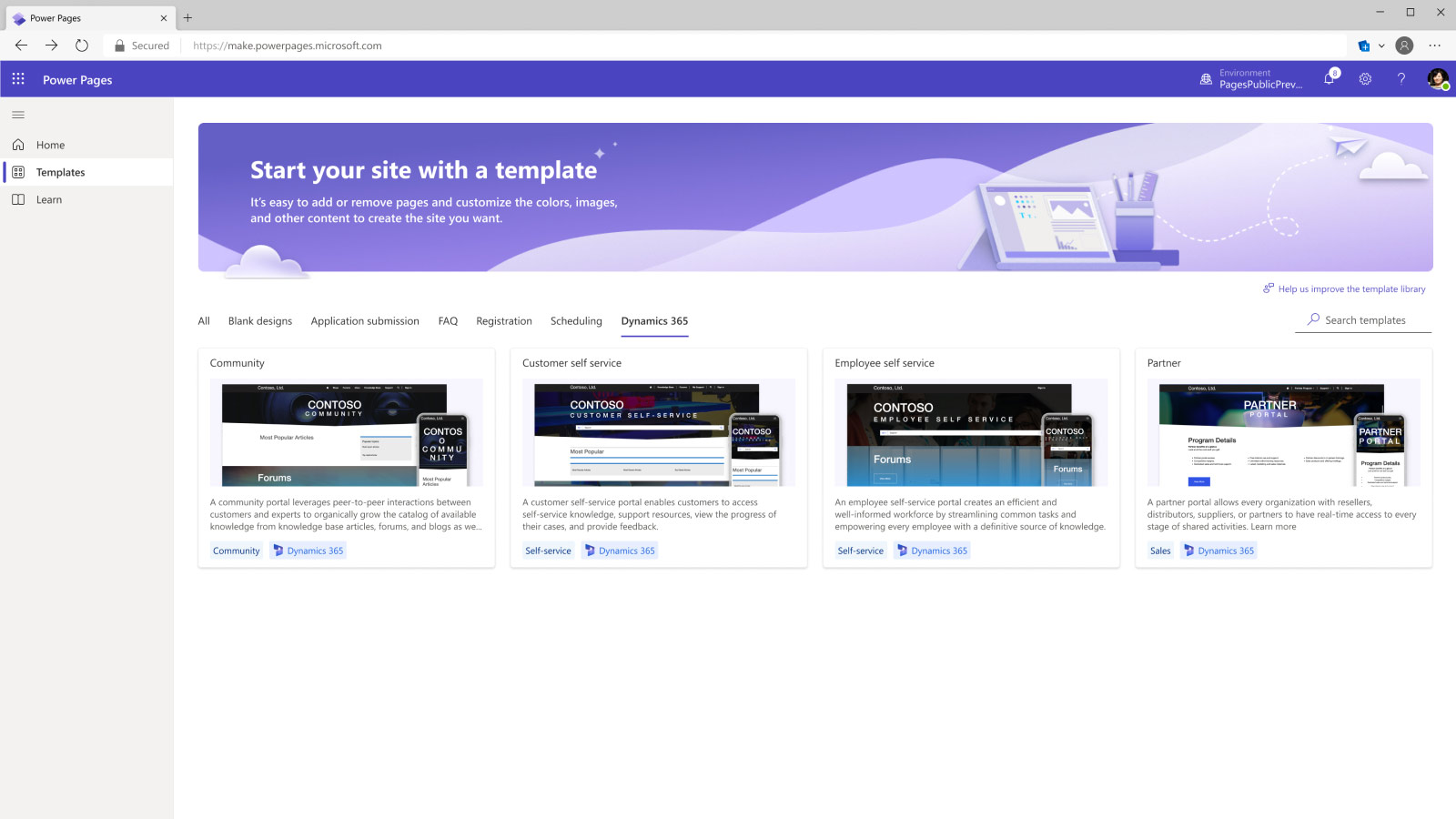
Use default templates to quickly build your page. The Power Pages library has a wide range of options to choose from.

ADAPTABLE

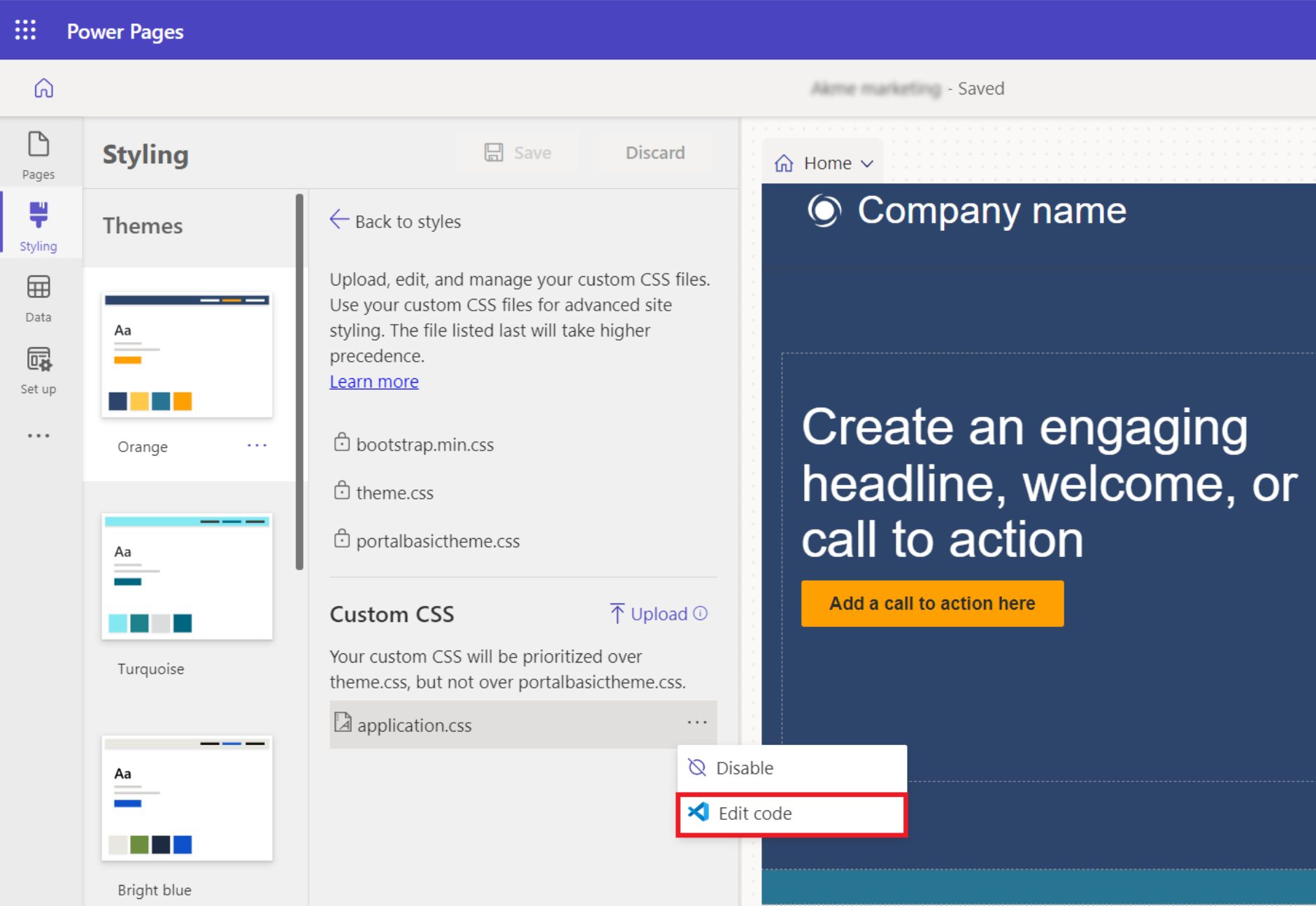
Whether using templates or starting from scratch, customize components in the style workspace to match your brand identity — colors, typography, and more.

EXTENSIBLE

MS Power Pages: Design Studio, Template Hub, Learn Hub; custom comps; via VS, GH, JS, Liquid, APIs, ADO; PowerFx, AI search extensible AI!

SECURE

Protect your site at every level with Power Pages: access control, Dataverse (Azure) security, GDPR compliance, WAF, IP & geo filtering.

What Does Power Pages Do?

Create in Design Studio

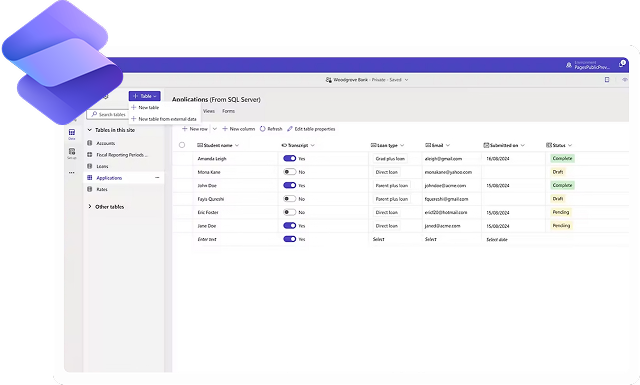
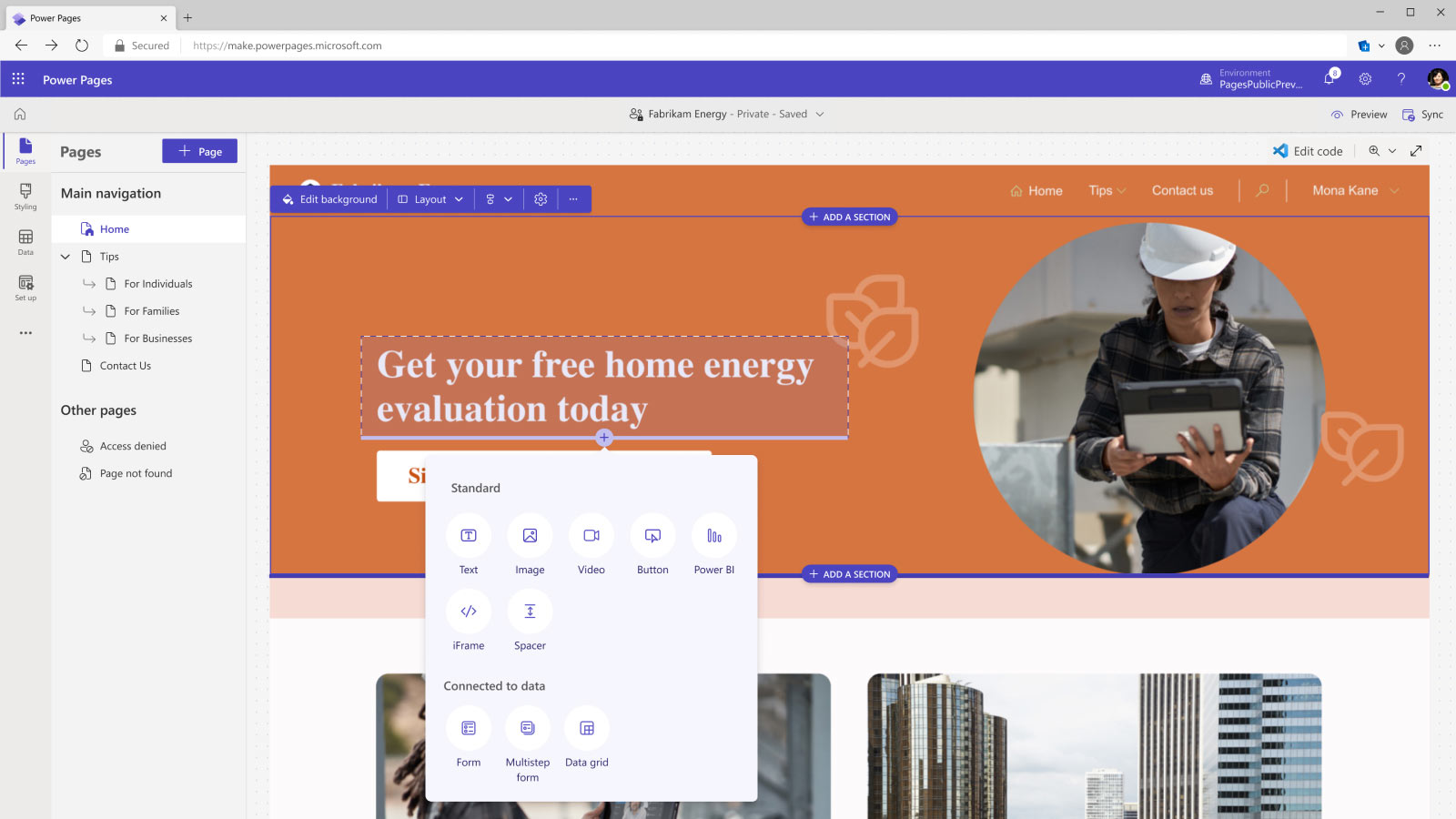
Easily build pages with ready-to-use templates or fully customizable designs using text, video, images, and business data forms. Bring them to life with themes from the styling workspace and align with your brand. Store and manage data in Microsoft Dataverse, designing forms and views directly on your pages. Build once on a standard framework that automatically renders seamlessly across desktop and mobile platforms. 

Build Faster with the Template Hub

Start with basic site building blocks and a default template with page structures, navigation, and common pages. Use industry-specific templates for business processes. Easily customize look, feel, and data, and extend functionality. Tailor user experiences and expand Dynamics 365 apps for customers, partners, and suppliers using ready-made templates.

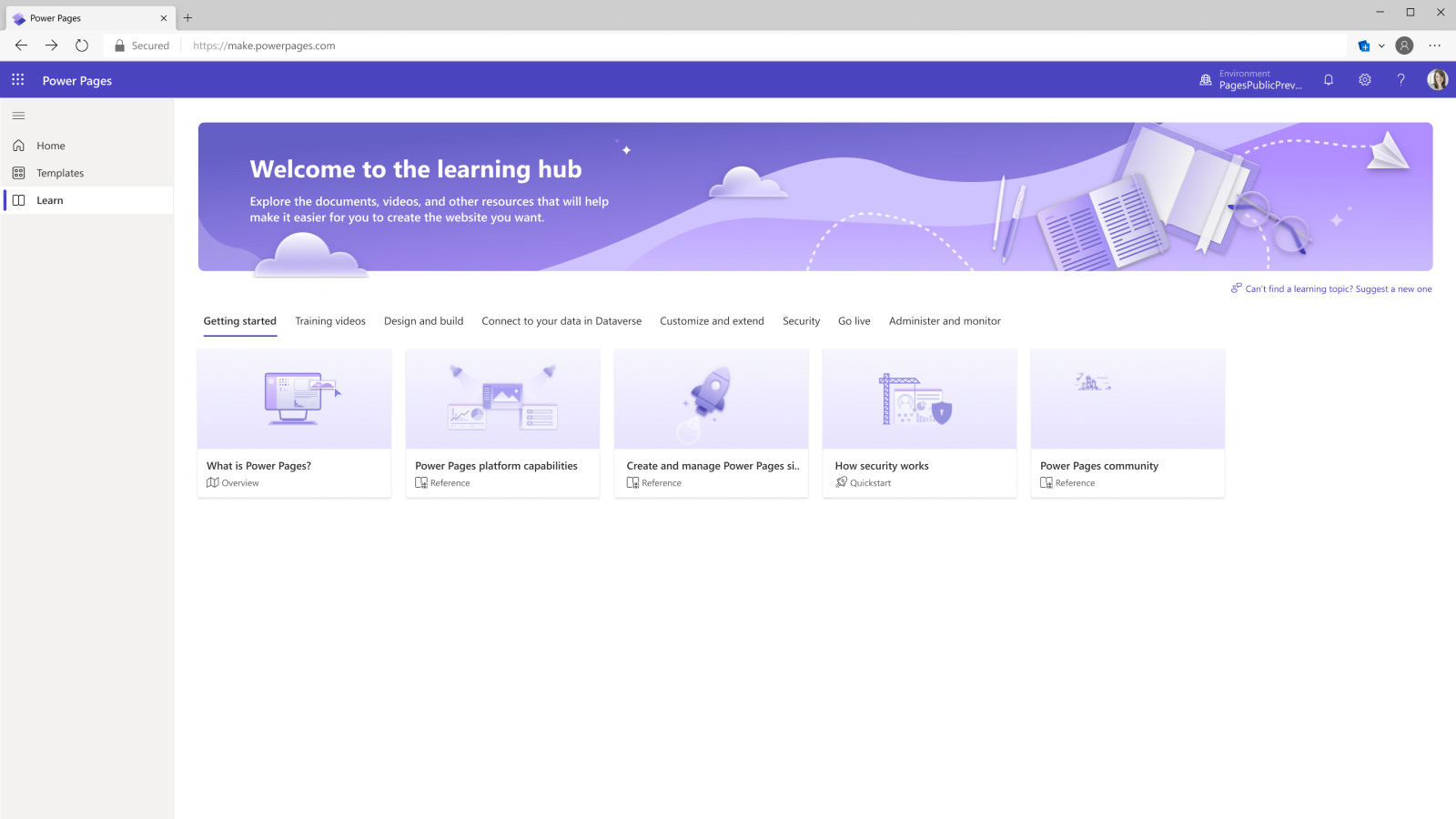
Get Help with the Learn Hub

Discover how to build, customize and administer your website through step-by-step tutorials, videos and documents. 

Go Further and Edit Page Code

If you have the in-house skills or capacity and want to adapt your website, users can view and change your page’s HTML, CSS and JavaScript with the built-in integration with vscode.dev.

Industries Where we Deliver Excellence

  • Citizen Services: Streamline access to public services with secure, user-friendly portals that improve citizen engagement and satisfaction. 
  • Regulatory Compliance: Ensure seamless adherence to local, state, and federal regulations with automated workflows and secure data handling. 
Government
  • Patient Portals: Enable patients to access records, schedule appointments, and communicate with providers securely. 
    Clinical
  • Collaboration: Facilitate efficient coordination between healthcare teams and external partners through integrated, compliant platforms. 
Healthcare
  • Student & Faculty Portals: Provide students and staff with centralized access to resources, enrollment tools, and academic services. 
  • Alumni Engagement: Maintain strong connections with alumni through interactive portals for events, donations, and networking. 
Education
  • Customer Self-Service: Offer clients secure access to account information, applications, and support, reducing manual processing. 
  • Regulatory Reporting: Automate compliance reporting while maintaining data integrity and security standards. 
Financial Services
  • Supplier & Partner Portals: Strengthen collaboration with vendors, distributors, and partners through centralized, real-time information sharing. 
  • Production Tracking: Monitor workflows and production status, improving transparency and operational efficiency. 
Manufacturing
  • Customer Engagement: Enhance online and in-store experiences with personalized portals for loyalty programs, orders, and promotions. 
  • Inventory & Vendor Management: Streamline inventory visibility and supplier interactions to optimize supply chain efficiency. 
Retail

Why choose Prodware?

As a certified Microsoft Gold partner with more than 30 years’ experience, we support our customers through their transformation journey, turning market challenges into sustainable growth opportunities.
With our experience across the Power Platform, our experts can support you with practical solutions and services to help you create low-code apps that solve your business issues with no development barriers, no waiting and with full business security and compliance.

Have a project? Let's talk!

Tell us about your project and we’ll show you how Prodware can transform your business.

* Please select one of these options:

AI Envision

A practical AI training service designed to activate AI adoption across your workforce
AI Envision

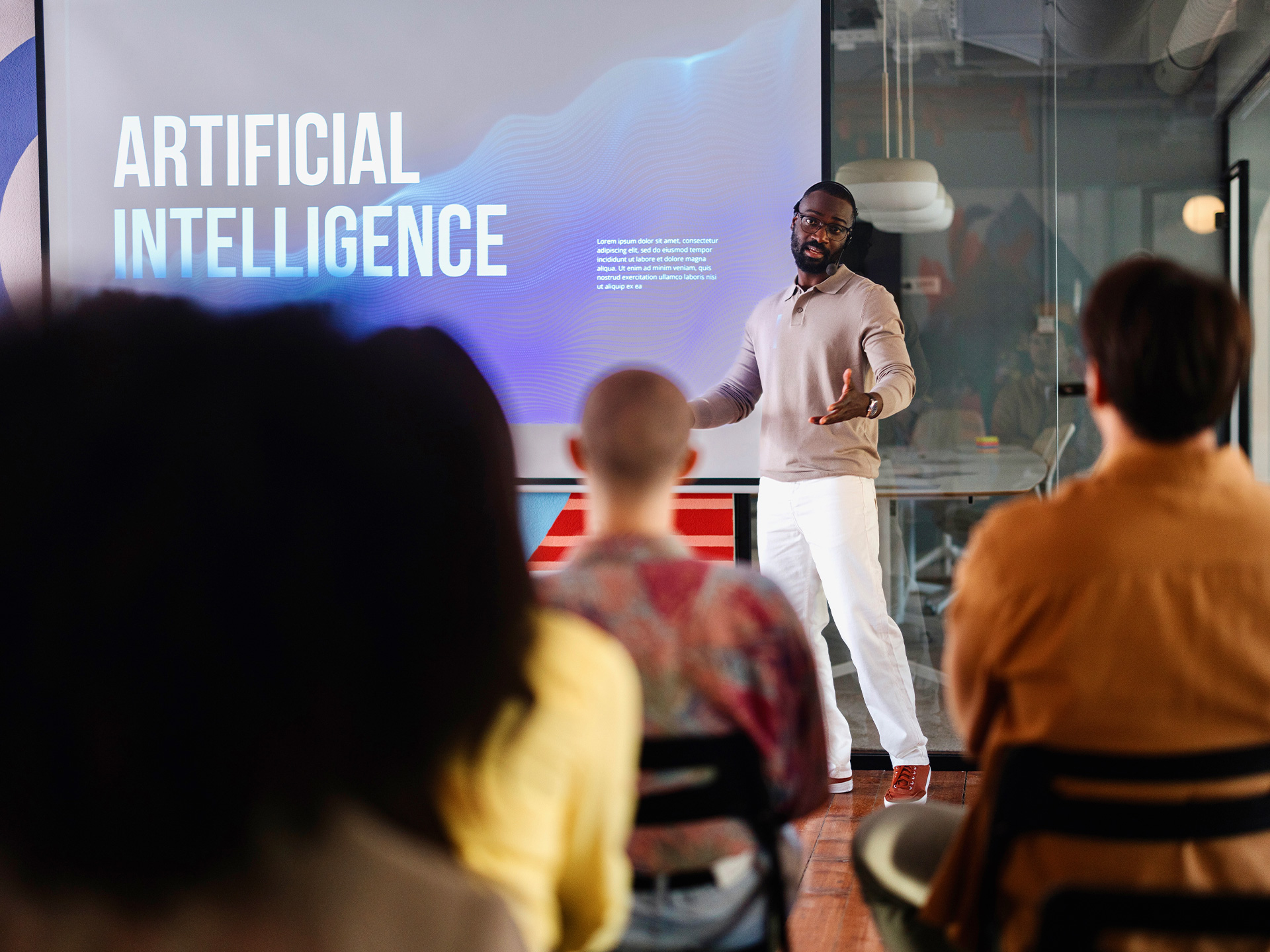
Why AI Training is Key for Success

AI adoption is accelerating across every industry, yet many organizations struggle to move from interest to action. Leaders, business teams, and IT functions are asking the same questions: what is AI really capable of, where does Artificial Intelligence technology add value, how do we manage risk, and how do we start without overcommitting.

Prodware AI Envision addresses these challenges in a structured way. AI Envision is an AI training and enablement service designed for all employees. It is the fastest path from AI curiosity to clarity. All AI Envision programs follow one methodology, with Workforce training focused on Copilot Chat and Microsoft 365 Copilot, and platform-based training aligned to Copilot in Dynamics 365 Business Central, Finance, Supply Chain Management, Customer Engagement plus AI in Sage.

How does AI Envision training work?

AI Envision follows a structured AI training journey, to help organizations move from AI awareness to practical adoption. Each step builds progressively on the previous one, combining expert guidance, real demos, and hands‑on exercises.

Step 1 - Build a Shared Understanding of AI at Work

Participants gain practical AI understanding, including generative AI, workplace impact, ethics, legal issues, Copilot, and agentic AI in simple terms.

Step 2 - Learn How to Work Effectively With AI

Practical AI training session that helps participants structure prompts, apply proven patterns, avoid common mistakes, and practice using AI on real work tasks.

Step 3 - Apply AI to Real Business Scenarios

Participants see how Copilot and AI agents enable role-based scenarios in their business tools and processes through practical demos.

Step 4 - Explore Agentic AI and Identify Opportunities

Introduces agentic AI; participants review use cases, understand governance, and complete a questionnaire to assess organizational readiness and opportunities.

Step 5 - Turn Learning into an Adoption Roadmap

Final session consolidates outcomes: experts share questionnaire insights, prioritize use cases, and deliver the AI Envision Report, guiding the next steps.

How does AI Envision training work?

Start your AI Journey with Confidence

Equip your teams with the right knowledge to use AI tools as part of your digital transformation.

What are the Benefits of AI Envision?

Structured Adoption Journey

Structured training journey moves organizations from AI awareness to practical adoption through progressive steps, combining guidance, demonstrations, and hands-on exercises.

Address Business Challenges

Addresses technology-related challenges, helping leaders, teams, and IT understand capabilities, identify value, manage risk, and start effectively without overcommitting resources.

Tangible Business Outcomes

Delivers tangible outcomes structured AI training, learning assets, and insights into priority use cases, guiding next steps in AI adoption journey.

Business-aligned AI Strategy

Aligns AI initiatives with business realities through expert guidance, enabling organizations to match disruptive technologies with challenges and opportunities effectively.

What are the Outcomes and Deliverables from the AI Envision Service?

AI Envision delivers tangible outcomes that combine structured AI training, shared learning assets, and clear insight into where to focus next in your AI adoption journey.

Structured AI Training & Certification

This five-session, expert-led AI training combines theory, live demonstrations, and guided exercises. Upon completion, each participant receives an AI Envision badge.

Collaboration Space & Learning Materials

A Microsoft Teams collaboration site is launched prior to the program and remains active for 30 days after, providing access to recordings, materials, demo scripts, and moderated Q&A.

Use‑case Insights & Report

High impact findings from a user questionnaire are consolidated into the AI Envision Report with prioritized use cases and next steps.

FAQ

AI Envision provides a structured, five‑session program that moves organizations from awareness to action through practical training, real use cases, and hands‑on exercises. It concludes with a clear set of prioritized opportunities and an AI Envision Report, enabling leaders to identify where AI delivers the most value and how to start adopting it effectively.

Leaders gain a clear view of high‑impact AI use cases, supported by a structured questionnaire and expert analysis. Deliverables include a final report with prioritized opportunities, training materials, recorded sessions, and a collaboration workspace—ensuring both strategic clarity and practical next steps for scaling AI adoption.

No. AI Envision is designed for all employees and introduces AI concepts in a non‑technical way. Participants build practical skills through guided exercises, learning how to use tools like Copilot in everyday work scenarios without requiring coding or specialist knowledge.

Participants learn how to apply AI in daily work, including writing effective prompts, using Copilot in role‑based scenarios, and understanding how AI agents support business processes. The program combines theory, live demonstrations, and hands‑on practice to ensure immediate, practical application.

AI Envision is available in multiple variants, each following the same structured methodology but tailored to specific platforms: Workforce (Microsoft 365), Dynamics 365 applications (Business Central, Finance, Supply Chain Management, Customer Engagement), and Sage environments.

Why choose Prodware?

As leaders in digital transformation, we act as a trusted advisor to help clients align disruptive technologies with business realities to address their key challenges. We design and deliver AI training and consulting services, as well as AI-infused applications, to support organizations throughout their AI journey.

Have a project? Let's talk!

Tell us about your project and we’ll show you how Prodware can transform your business.

* Please select one of these options:

AI Form Assistant

Automatically complete forms to boost productivity and reduce data input errors
AI Form Assistant

How AI Form Assistant Helps Your Enterprise to Be More Efficient

A lot of daily business tasks involve recurring administration which focus on capturing, transferring and storing information via forms in ERP and CRM, with challenges in efficiency, accuracy and productivity, impacting the bottom line and causing issues in the supply chain and customer experience.

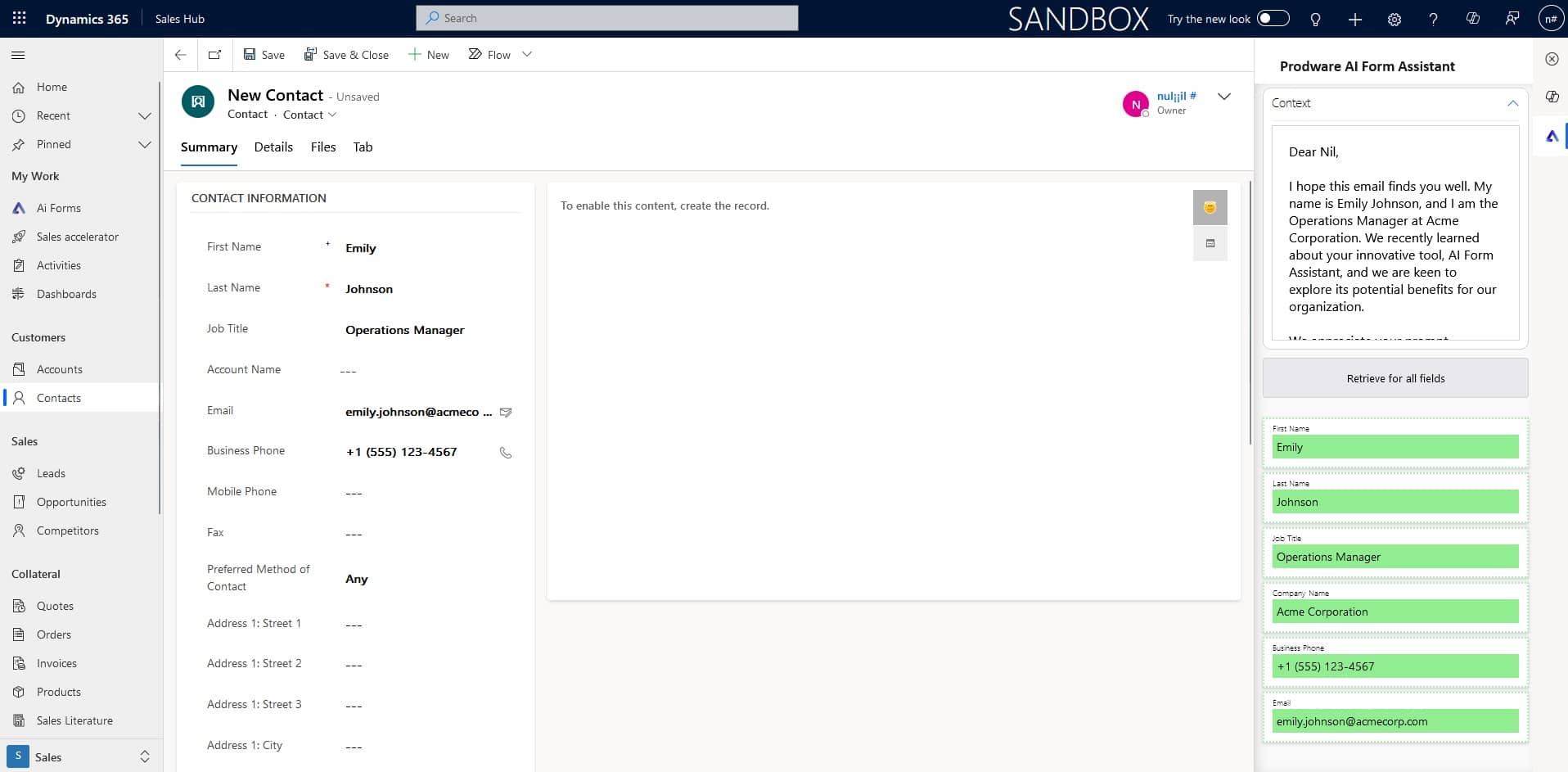
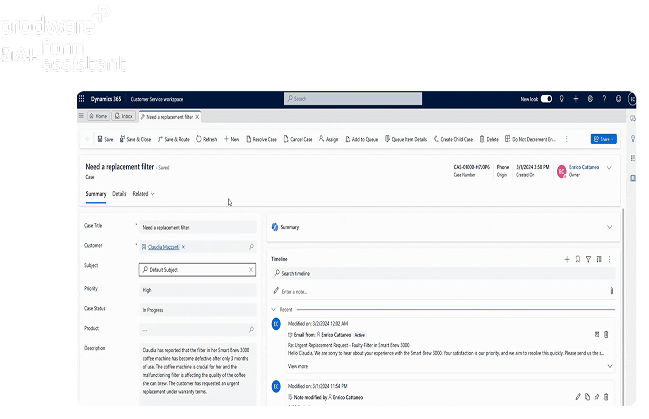
Prodware AI Form Assistant provides users with real-time suggestions for automatically filling in forms within business applications from a source text such as an email, chat or document.

Cost-effective Transformation Across Business Areas with AI Form Assistance

These are just a few business scenarios where data entry is required, takes time and needs optimum accuracy: AI Form Assistant is fully flexible – the possibilities are endless.

Sales

Reduce CRM administration and bottlenecks to allow commercial teams more time with prospects and customers.

Customer Service

Reduce case admin. and speed up communication by automatically creating requests and updates for colleagues from various data points including chat transcripts.

Human Resources

Streamline employee onboarding and offboarding by completing mandatory forms from data held in documents and emails.

Finance

Reduce ERP data entry errors and administrative effort across finance and procurement, such as purchase order creation or supplier onboarding from email requests.


Cost-effective Transformation Across Business Areas with AI Form Assistance

Smarter Form Completion, Built In

Enable AI-powered form completion directly within your teams’ everyday business applications.

Benefits of AI Form Assistant

Faster Data Capture

AI automates Dynamics 365 form filling, reducing manual entry, speeding submissions, improving accuracy, and requiring minimal training.

Improved Data Quality

Uses intelligent validation and contextual understanding to reduce errors, ensure completeness, and capture standardized, high-quality data at the point of entry across the organization.

Enhanced User Experience

AI guides users through forms with conversational prompts, simplifying fields, reducing effort, and speeding confident completion of work tasks.

Seamless Platform Integration

Integrates natively with Microsoft Dynamics 365, enabling scalable AI-driven forms without custom development, while ensuring governance and security.

Features of AI Form Assistant

Ready-to-go and Accessible

Available out-of-the-box and integrated directly within your familiar Microsoft Dynamics 365 ERP (Business Central and Finance & Supply Chain Management) and CRM (Customer Engagement) applications. Your subscription allows all business app users to benefit from this AI technology.

Real-time Contextual Understanding

AI Form Assistant can interpret user input, anticipate the intended context, and offer near real-time suggestions to populate form fields accordingly.

Multi-lingual Adaptability

When users receive a text in any language, they can ask AI Form Assistant to directly extract the information needed without needing to translate the information in advance.

Handling Unstructured Data

Users can directly paste the text from any source in any format and send it to the AI Form Assistant to extract the desired fields, with no pre-processing needed.

Enhanced User Experience and Error Reduction

AI Form Assistant automates data extraction and cross-referencing from provided text, allowing users to simply input content and then review, approve, or adjust the suggested outputs while the assistant handles the rest.

How AI Form Assistant Helps

  • Paste emails/chats to auto-suggest Lead and Opportunity fields in Dynamics 365.
  • Generate Sales Quotes from unstructured requests: products, quantities, delivery dates.
  • Handle multilingual enquiries without translation; review and approve suggested entries.
Sales Teams
  • Create Case (Incident) records from customer emails with suggested title/category/details.
  • Paste chat transcripts to structure case notes and updates consistently.
  • Extract details from any format, then approve/modify suggestions before saving.
Customer Service Agents
  • Turn service request emails into Work Orders with suggested priority, description, and scheduling details.
  • Populate Customer Asset details from installation/handover emails without pre-processing.
  • Paste technician emails to auto-suggest structured work order notes for full service history.
Field Service
  • Paste supplier onboarding emails to suggest Vendor master data (tax, address, terms).
  • Use invoice emails to suggest Vendor invoice fields (number, totals, dates).
  • Extract billing requests into customer invoicing forms, then validate suggested values.
Finance Teams
  • Create Purchase Orders from supplier quotes: header values, incoterms, delivery dates, lines.
  • Convert customer emails into Sales Orders with suggested items, quantities, and ship dates.
  • Populate Inventory journal entries from warehouse emails; user reviews suggested fields.
Supply Chain & Procurement

FAQ

AI Form Assistant automates data entry in ERP and CRM forms by extracting information from emails, chats, and documents, reducing manual work, errors, and processing bottlenecks across business teams.

AI Form Assistant is available out of the box and integrates directly with Microsoft Dynamics 365 ERP (Business Central, Finance and Supply Chain Management) and CRM (Customer Engagement), with no complex setup required.

Users paste text from any source into AI Form Assistant, which understands context and suggests values to automatically populate form fields in real time, requiring only review and approval.

Yes. AI Form Assistant can extract data from unstructured text in any format and supports multiple languages without requiring translation or pre processing.

No. AI Form Assistant is embedded directly in familiar Dynamics 365 applications and designed for everyday users, making it easy to adopt with minimal change to existing workflows.

Why Choose Prodware?

As leaders in digital transformation, our approach as a trusted advisor for our clients helps you match disruptive technologies with business realities, to meet your challenges. We create AI-infused apps and solutions to answer your needs with competitive advantage and innovation in mind.

Have a project? Let's talk!

Tell us about your project and we’ll show you how Prodware can transform your business.

* Please select one of these options:

AI Content Generator

Turn your knowledge into professional documents within minutes

AI Content Generator

Why AI Content Generation is Key for Success

Creating client-ready documents is often slow and fragmented. Knowledge is scattered across multiple systems, requiring manual copy-paste that disrupts structure, tone, and branding, while increasing the risk of errors. Generic AI tools also fall short when it comes to producing complex, brand-compliant documents that teams can rely on.

AI Content Generator is an enterprise-grade solution that helps teams co-create high quality Microsoft Word and PowerPoint documents using Generative AI, trusted internal data, and corporate templates. Designed for complex, document-heavy scenarios, it removes the blank-page problem and dramatically accelerates content production while keeping you in control.

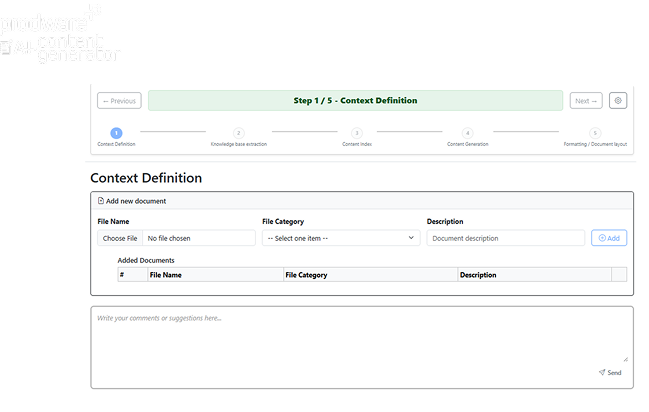
How AI Content Generator Works: A Guided 5-step Co-creation Process

Azure-native AI app with guided human-in-the-loop workflow combines AI content generation to co-create accurate, on-brand documents.

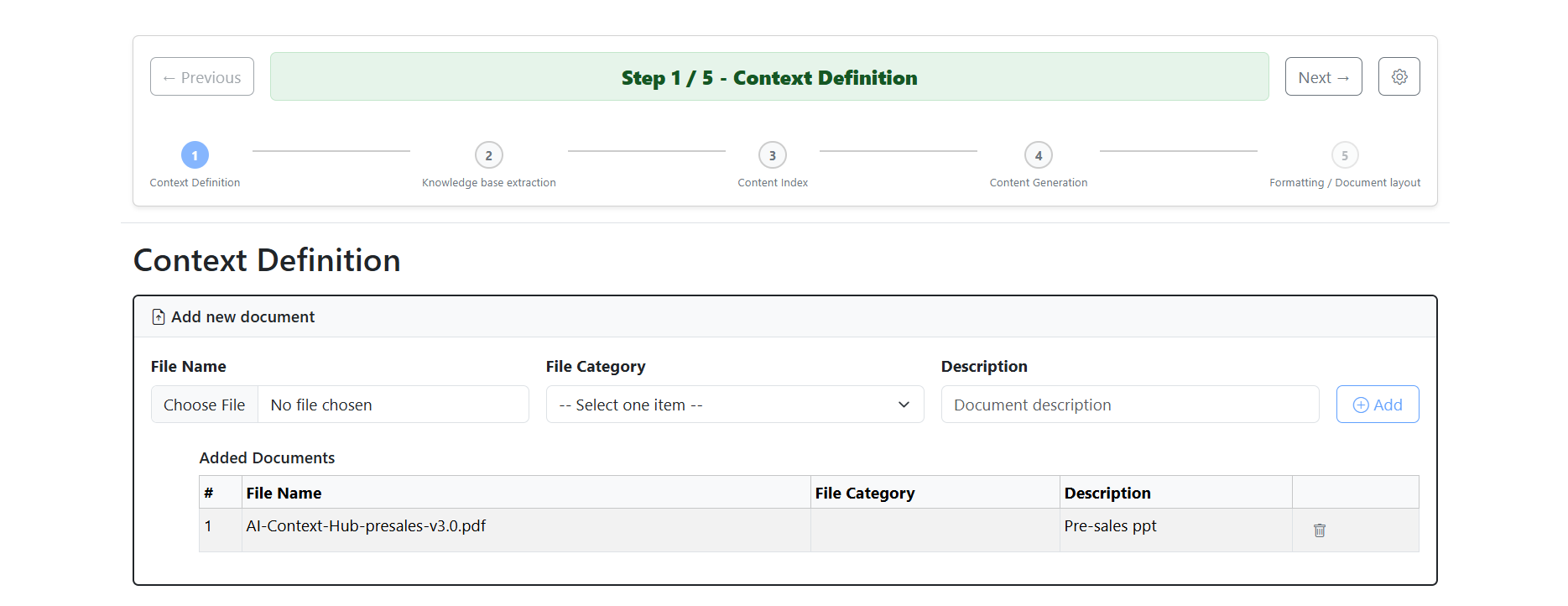
Step One - Describe Your Objective

Provide the AI with the context, purpose, and constraints of the document you want to create.

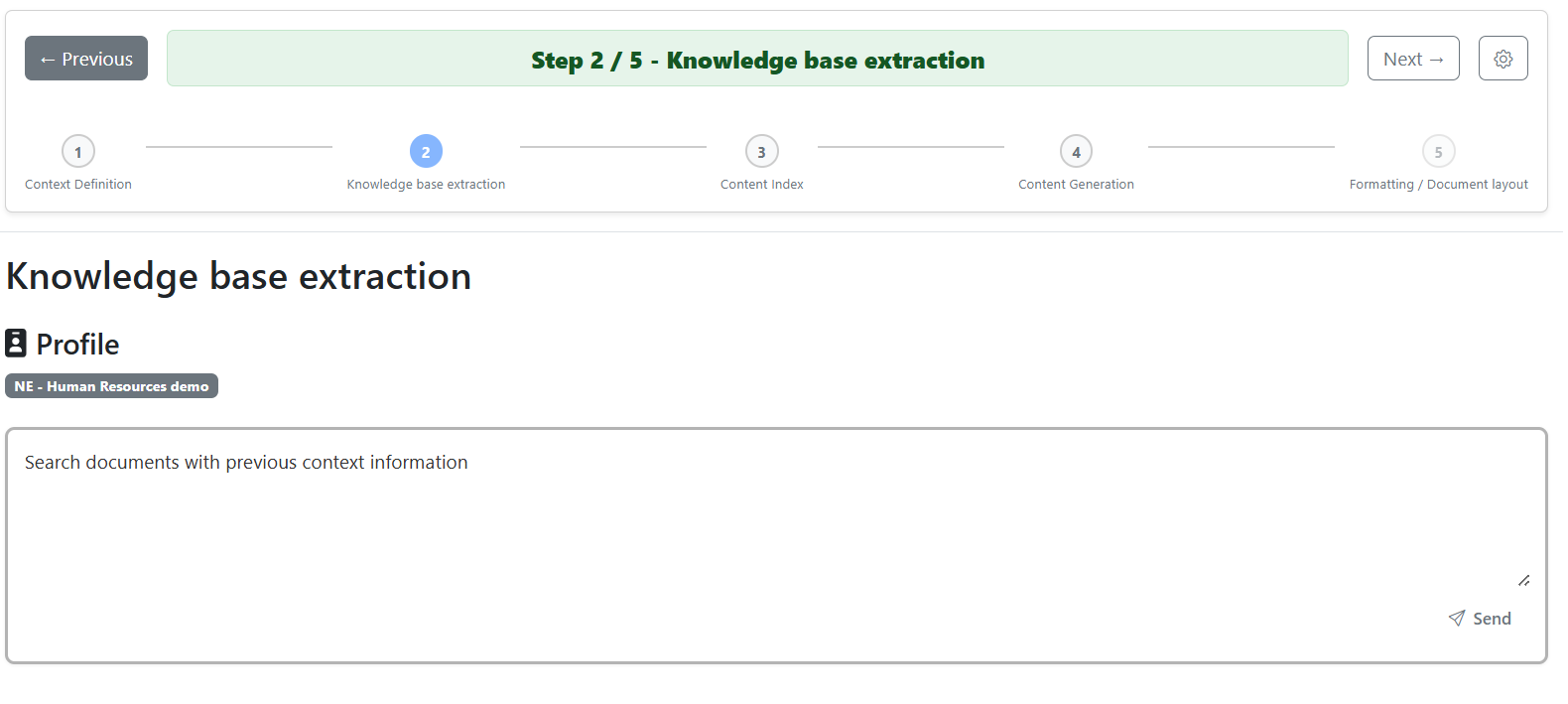
Step Two - Select Trusted Data Sources

Choose internal documents (SharePoint and other sources) the AI should use as references.

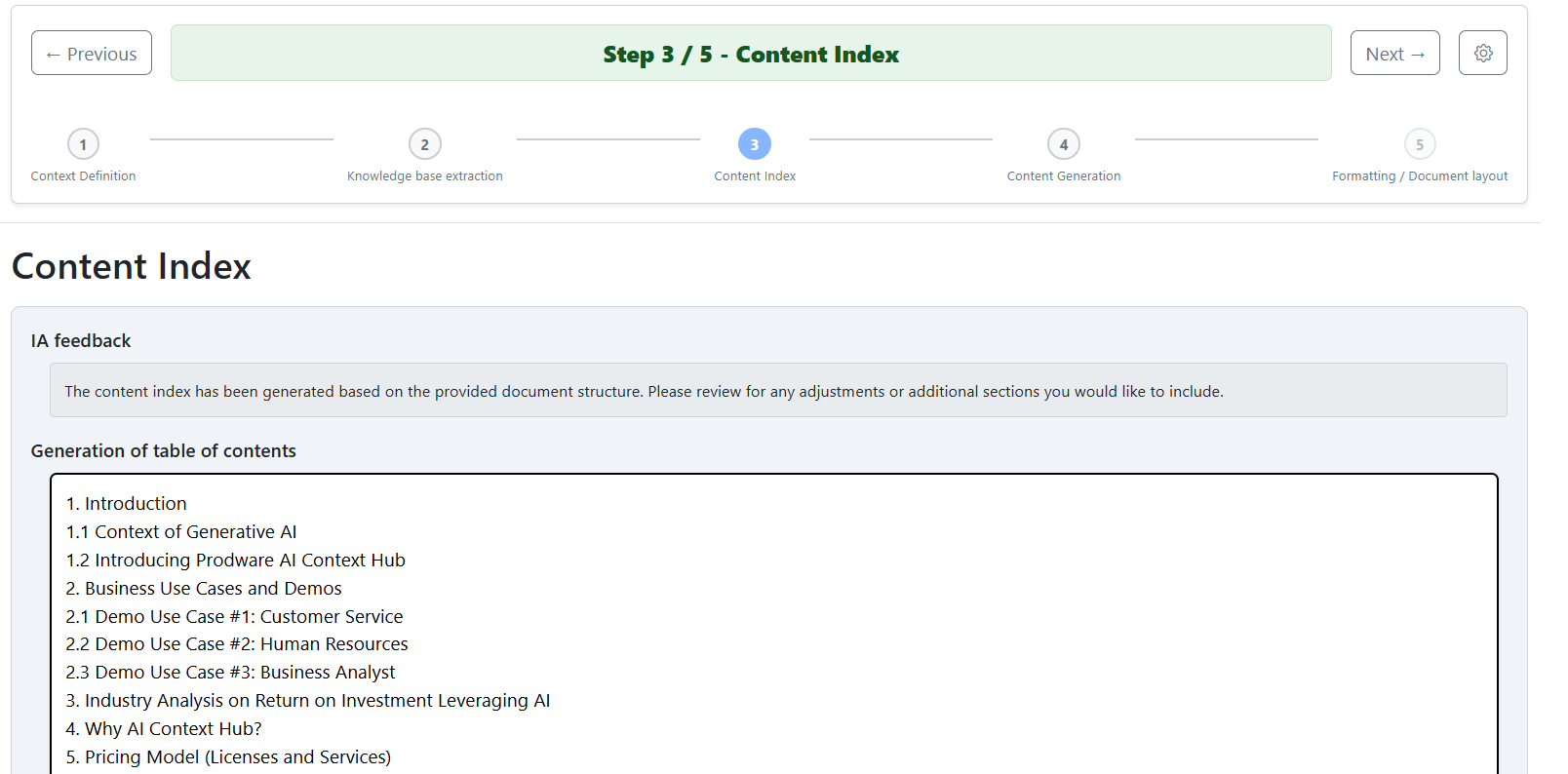
Step Three - Validate the Structure

AI Content Generator proposes a table of contents that you can review, edit, and approve.

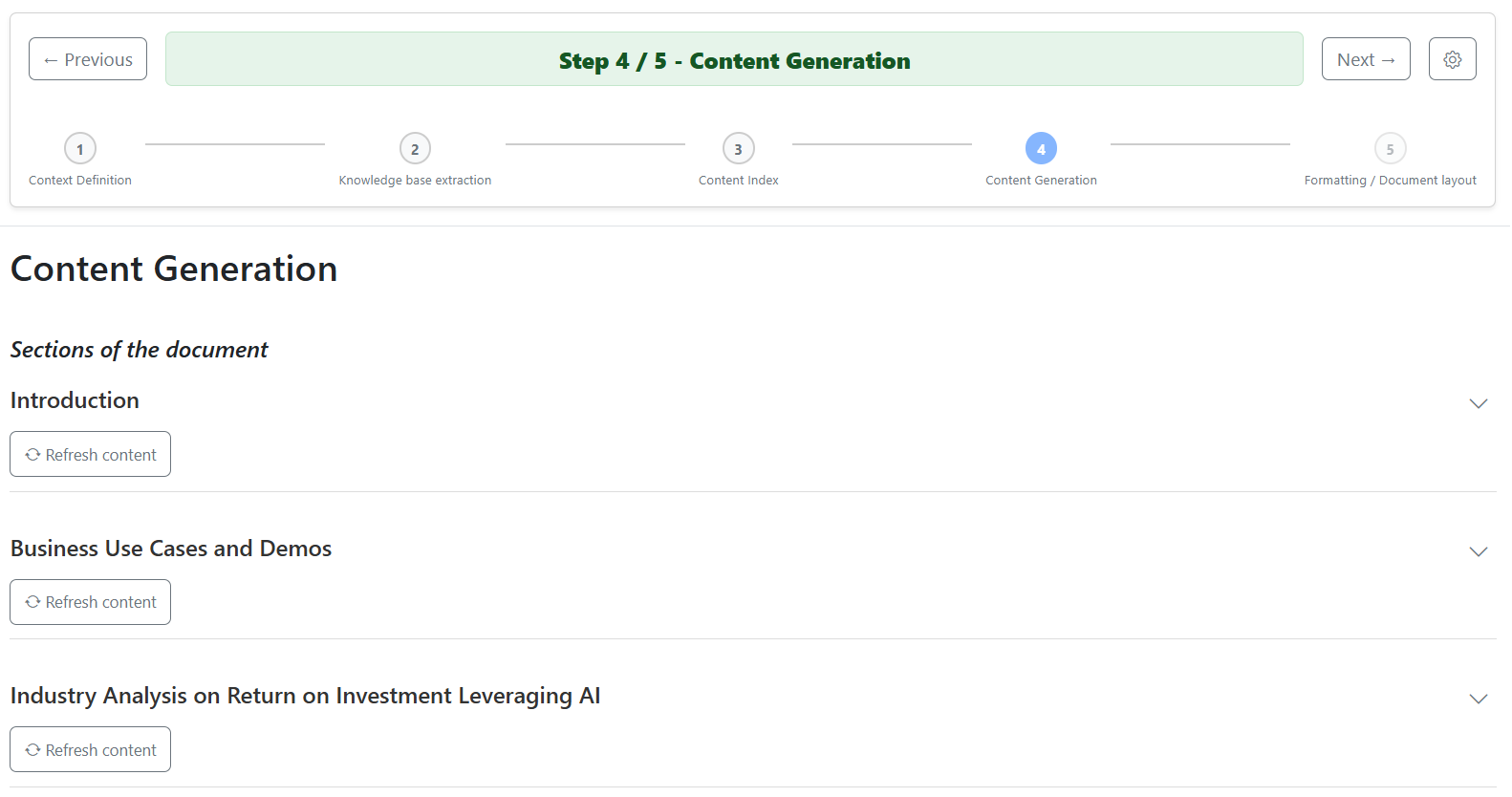
Step Four - Co-create the Content

Section by section, the AI generates content that you can refine and validate.

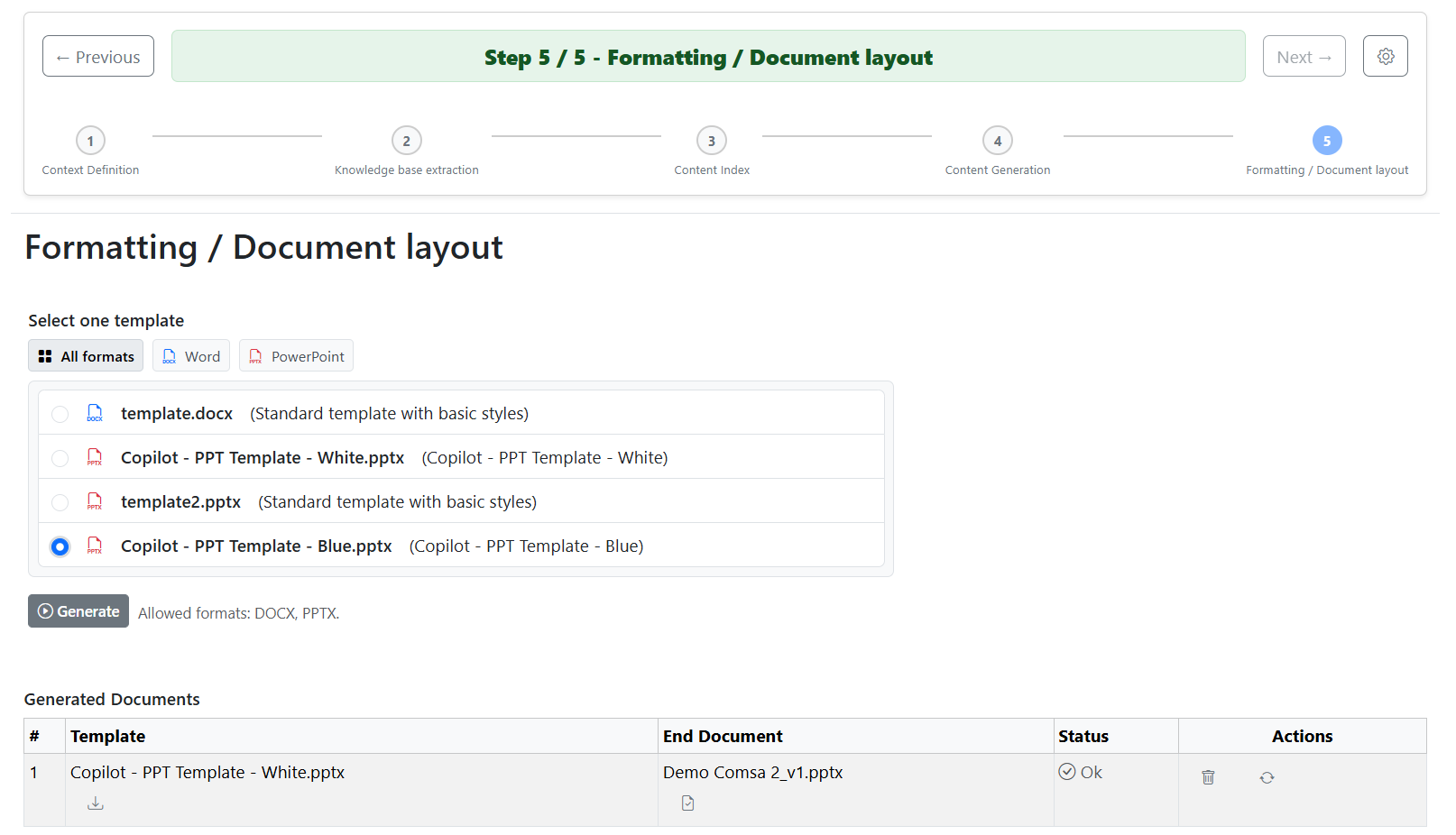
Step Five - Generate the Final Document

Export the document directly into your selected Word or PowerPoint template, ready for final human review.


How AI Content Generator Works: A Guided 5-step Co-creation Process

Ready to Transform Your Content Creation?

Prodware helps you deploy secure, scalable, and high-value AI solutions to accelerate content generation.

Benefits of AI Content Generator

Break the Blank-Page Barrier

Generate complete Word documents and PowerPoint presentations in minutes using AI grounded in your own internal knowledge and data.

Trust Your Content

Content is sourced from validated internal knowledge, reviewed for accuracy and compliance at every step.

Stay on Brand

Documents are automatically created in approved templates, preserving structure, tone, and branding without extra formatting.

Built for Complex Business Use Cases

Supports high-stakes content such as RFPs, investor decks, compliance reports, process manuals, and executive presentations.

Features of AI Content Generator

Guided Human-in-the-loop Content Creation

AI generates content step by step, with users reviewing, editing, and validating structure and text at every stage to ensure accuracy and relevance.

Trusted Data Grounding

Content is generated exclusively from selected internal sources (such as SharePoint and approved documents), preventing hallucinations and ensuring factual consistency.

Structure-first Document Generation

Automatically proposes a table of contents and document logic that users can adapt before content creation begins.

Native Word & PowerPoint Output

Documents are generated directly into Microsoft Word and PowerPoint, ready for final review and immediate use—no conversion or reformatting required.

Template-based Content Generation

Uses corporate templates to preserve layout, branding, tone, and formatting across all generated documents.

Enterprise Security & Azure Foundation

Built natively on Microsoft Azure, ensuring enterprise grade security, compliance, and data control aligned with Microsoft standards.

Multi-source Content Reuse

Combines insights from multiple internal documents and past deliverables to create consistent, reusable content across teams and projects.

Where We Deliver AI Content Excellence

  • Drafts RFP responses in minutes.
  • AI uses statements of work, past answers, and compliance rules.
  • Cuts preparation time for pre-sales consultants.
  • Boosts win rates and lowers costs.
Commercial Teams
  • Generates accurate compliance reports.
  • AI processes clinical data, regulations, and historical submissions.
  • Reduces report prep from days to hours.
  • Improves productivity and eases audits.
Compliance
  • Accelerates investor presentations.
  • AI transforms financial projections, property data, and market analytics.
  • Polished, client-ready decks delivered.
  • Enhances fundraising and stakeholder engagement.
Investor Relations
  • AI compiles equipment specs, safety protocols, and SOPs.
  • Minimizes downtime and ensures compliance across plants.
Manufacturing
  • Strategy leaders convert KPIs, dashboards, and trends into structured decks.
  • Cuts prep time from hours to minutes.
  • Enables faster decisions and frees time for strategic analysis.
Senior Management

FAQ

AI Content Generator accelerates the creation of complex, client ready Word and PowerPoint documents by turning trusted internal knowledge into structured, on brand content—reducing manual effort, errors, and time to delivery.

The solution is built on Microsoft Azure and uses validated internal data sources, approved templates, and a guided human in the loop process to maintain full control over data, permissions, accuracy, and compliance.

Users follow a guided five step process: define the document objective, select trusted internal sources, validate the structure, co create content section by section, and export directly to Word or PowerPoint templates.

It supports complex, high value documents such as RFPs, investor presentations, compliance reports, process manuals, and executive level Word documents and PowerPoint decks.

Unlike generic AI tools, AI Content Generator uses all your organization’s internal data, enforces structure and branding through templates, and includes human validation at every step for accuracy and trust.

Why Prodware?

As leaders in digital transformation, our approach as a trusted advisor for our clients helps you match disruptive technologies with business realities, to meet your challenges. We create AI-infused apps and solutions to answer your needs with competitive advantage and innovation in mind.

Have a project? Let's talk!

Tell us about your project and we’ll show you how Prodware can transform your business.

* Please select one of these options:

AI User Insights

Surface insights into how your business applications are used to drive productivity, adoption, and ROI

AI User Insights

How AI User Insights Drives Enterprise Success

The benefits from implementing leading business applications such as Microsoft Dynamics 365 is how employees adopt and use the functionalities to improve daily processes, productivity and efficiency.

But how can you gain insights into how employees are using business tools and how these applications align with business processes?

At any stage of an IT project—from scoping and migration to pilots, proofs of concept, and rollouts—user behavior is a key factor in your analysis to understand priorities, ROI, and training needs.

How Does AI User Insights Support IT and Process Optimization?

AI User Insights integrates with Dynamics 365 to track user activity aligned with workflows, providing interactive dashboards and reports.

Detect Unusual User Behavior Patterns

Outliers and Anomalies can signal potential issues or improvement opportunities.

Detect Trends And Usage Patterns

Visualizations and metrics to identify trends, serving as benchmarks for process improvement and automation.

Personalize User Experience

Admins can give tailored recommendations to each user based on usage trends, enhancing productivity and user satisfaction.

Enhance Application Development

Reveal pain points, feature preferences, and usage patterns. Businesses can prioritize enhancements and drive effective innovation.


How Does AI User Insights Support IT and Process Optimization?

Turn User Behavior Into Actionable Insights

Ask Prodware how we can help unlock intelligence with AI to improve business processes and technology adoption.

Benefits of AI User Insights

Improve User Adoption And ROI

Understand how employees use apps to improve adoption and ROI by tailoring support, training, and recommendations to real behavior patterns.

Optimize Business Processes With Data Driven Insights

Identify bottlenecks, inefficiencies, and improvement opportunities using real usage data, and detect anomalies, drop-offs, and outliers early—before they impact performance.

Accessible Without Coding

AI User Insights unlocks hidden intelligence within Dynamics 365 data, delivering actionable insights without requiring technical skills and supporting any organization’s data-driven transformation.

Fully Integrated and Ready

Works out-of-the-box and integrated in Dynamics 365 ERP (Business Central, Finance & Supply Chain Management) and Dynamics Customer Engagement (CRM) apps.

Features of AI User Insights

Menu & Configuration

Set up your environments, applications, users, forms, items, tasks, and dynamic filters for reporting.

Paths

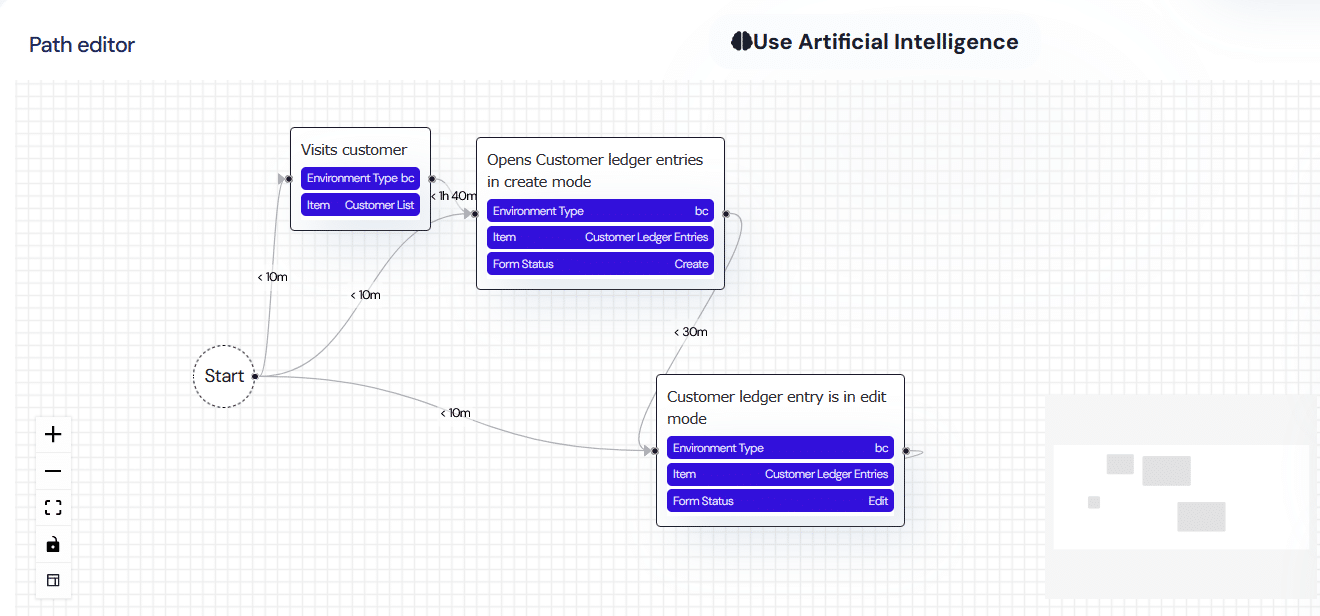
Paths define a sequence of events or actions to be executed in a defined order within a maximum time frame, aligned with productivity and process targets. Users can build them via drag-and-drop or let AI generate them from natural language prompts.

Global View

Your Home screen provides an overview of KPIs and global usage reports across all applications within your environment.

Time Series

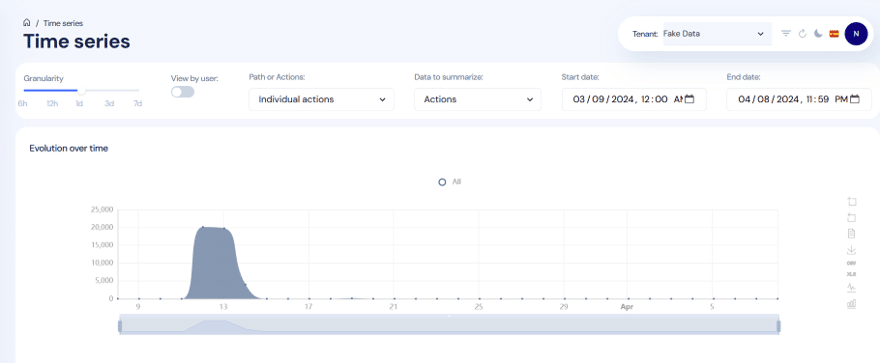
A report showing the evolution of user activity data over time, with adjustable time periods, intervals, and path types, enabling analysis by volume, frequency, and user.

Adoption and Recurrence

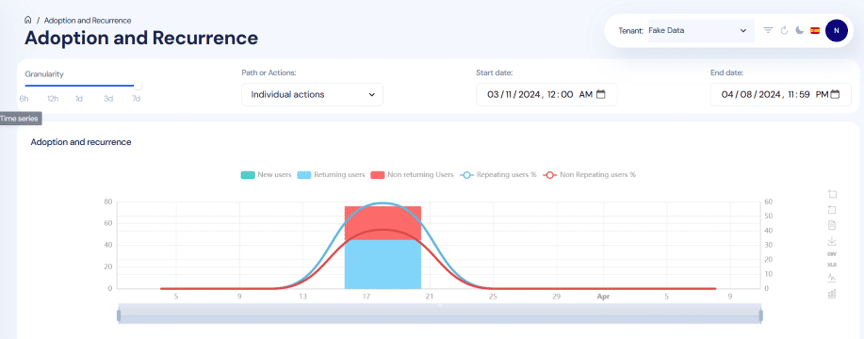
Admins can analyze adoption speed and repetitive behaviors for new actions or paths over a defined time period, segmented by new, returning, and non-returning users.

Path Funnel

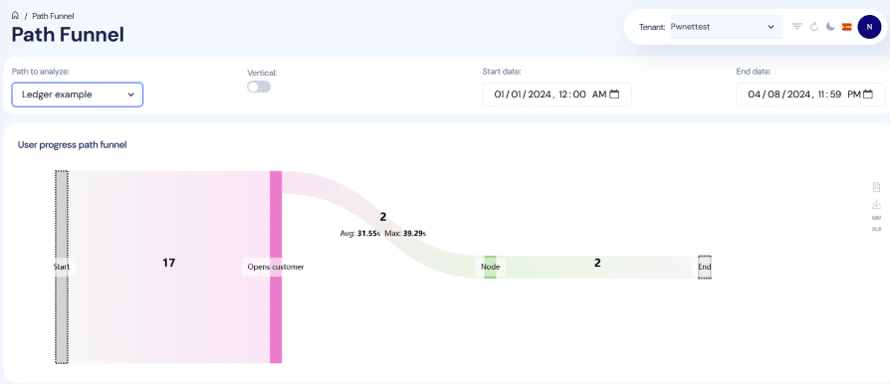
A report to show insights on each path to optimize business processes. You can view the number of users passing through each point, time spent (average and maximum).

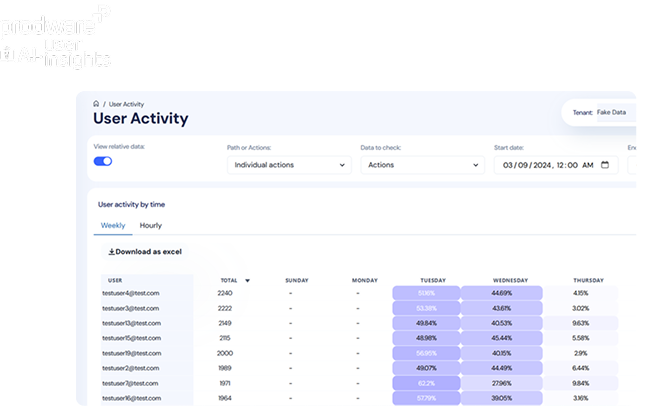
User Activity

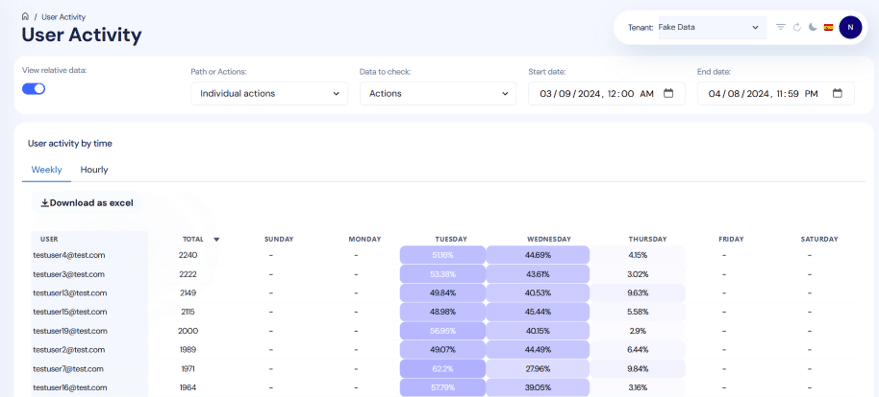
This analysis shows individual user activity over time (by hour, day, or week), helping identify periods of higher activity globally and by path. This insight highlights usage trends and outliers.

Duration Histogram

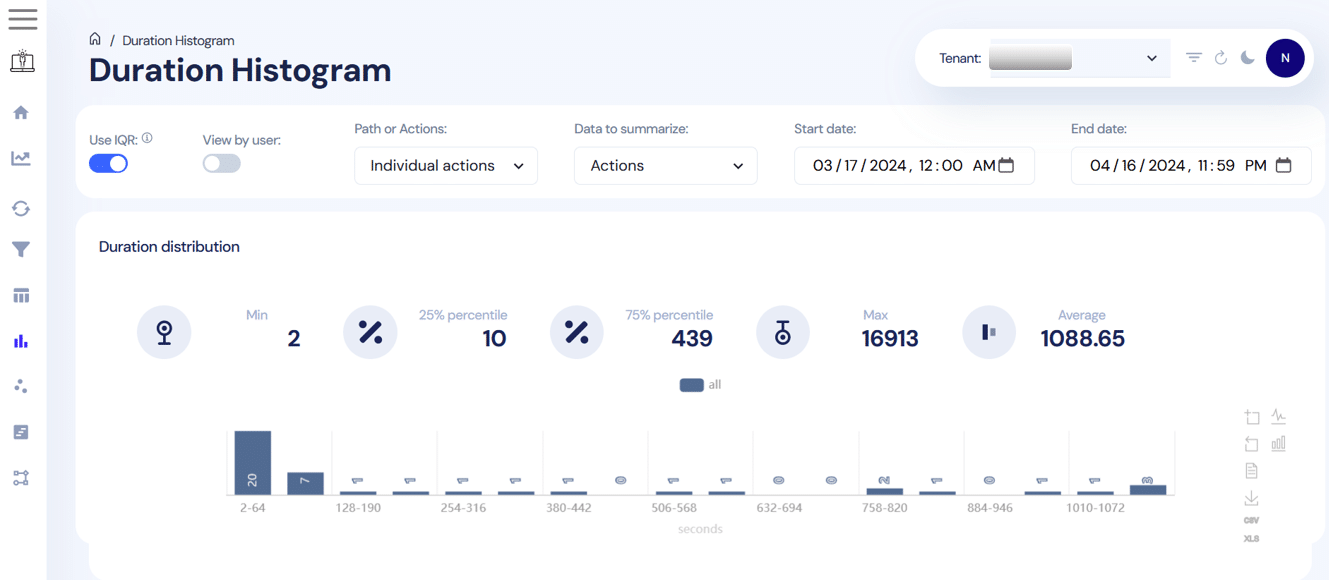
A time-based report showing the time spent by users on different actions or paths, broken down by volume and percentage. This enables managers to identify efficiency levels and productivity patterns within workflows.

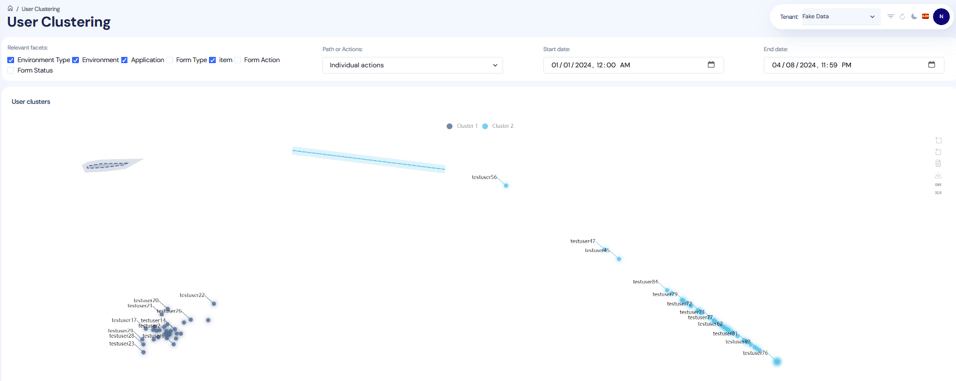
User Clustering

Clustering enables you to identify overall user behavior patterns and compare differences across actions and processes, helping to detect common issues at the user, process, or task level.

User Timeline

Displays each action in a user’s activity history to understand individual behavior and identify specific training or support needs.

Secure And Flexible

Admins control access at the tenant, application, and user levels. All data is encrypted and complies with Azure privacy standards. No user profiling is performed.

AI User Insights is Helpful for...

  • Improve case-handling process compliance. Define the expected service workflow as a Path and use path insights to identify where agents deviate or slow down—so you can target coaching and streamline steps.
  • Detect unusual handling patterns that signal quality or training issues. Use outliers and anomalies detection plus usage trends/outliers reports to spot atypical behavior enabling earlier intervention and more consistent service execution.
  • Reduce resolution time by pinpointing workflow inefficiencies. Use the time-based reports to identify which actions consume the most time and benchmark improvements after process changes or automation.
Customer Services
  • Target training during HR system rollouts. Use adoption speed and recurrence analysis to identify teams struggling with new HR workflows and focus enablement where adoption is lagging.
  • Identify where employees get “stuck” in HR self-service workflows. Define HR workflows as Paths and analyze each step to locate the exact steps causing friction, so HR can simplify guidance or adjust the process.
  • Personalize HR app guidance without profiling. Use the capability for admins to provide tailored recommendations based on usage trends to help different employee groups complete HR tasks more smoothly.
Human Resources
  • Create process benchmarks and spot improvement opportunities. Use visualizations and metrics to detect trends and usage patterns as baselines, then track changes over time using time evolution reports to quantify improvements after changes to workflows or automation.
  • Segment users by behavior to explain performance variation. Use user clustering to identify groups following different paths or struggling with specific tasks—supporting root-cause analysis and targeted change management.
  • Deep-dive into individual user journeys for evidence-based recommendations. Use user timeline/activity history and time-slot activity patterns to understand how work is actually performed and recommend process or UI changes grounded in observed behavior.
Business Analysts
  • Standardize campaign execution workflows. Define the workflow as a Path and use path insights to spot where marketers diverge from the intended process—improving consistency and reducing rework.
  • Increase adoption after new marketing features or rollouts. Use Adoption & Recurrence to see whether teams are actually using new capabilities after a pilot or rollout—so enablement can focus on groups with slow adoption.
  • Find bottlenecks in day-to-day marketing operations. Use time evolution reports and duration/time spent by action/path to benchmark how long key tasks take and identify steps that are slowing productivity for targeted process simplification or automation.
Marketing
  • Improve CRM process compliance. Model the desired sales motion as a path and analyze the funnel and step timing to identify where reps drop steps (e.g., missing qualification actions) or spend too much time, enabling targeted coaching and streamlined workflows.
  • Identify unusual rep behavior that may indicate risk or inefficiency. Use outliers/anomalies and usage trend/outlier insights to flag atypical patterns enabling earlier support and improved sales hygiene.
  • Segment rep behaviors to tailor enablement. Use user clustering to group reps by behavioral patterns across actions/processes, then use user timeline/activity history to validate where each cluster struggles—so training and sales playbooks can be personalized based on observed usage trends.
Sales
  • Optimize month-end close / period-end workflows. Define the finance close sequence as a Path and review path insights to locate bottlenecks and long-duration steps—supporting process improvements and more predictable close cycles.
  • Detect compliance or control exceptions in finance processes. Use outliers and anomalies plus time-based reports to spot unusual user behavior patterns around critical ERP actions, surfacing potential issues and improvement opportunities.
  • Drive adoption and reduce training gaps post-implementation. Use adoption speed and recurrence reporting to track which finance teams are engaging with new workflows after pilots/rollouts and use user activity timelines to pinpoint individuals or groups who need targeted support.
Finance
  • Improve adherence to warehouse execution processes (receive → put-away → pick → pack/ship). Configure warehouse workflows as Paths and analyze path funnel + step timing to identify where operators deviate or stall, supporting process refinement and targeted training to improve throughput.
  • Spot productivity issues and abnormal usage patterns. Use duration/time spent reports and outliers/anomalies to surface unusual behavior or long task durations that may indicate confusion, poor UI fit, or process issues—enabling faster corrective action.
  • Benchmark improvements after automation or device/process changes. Use trend metrics and time evolution reporting as benchmarks, then compare pre/post changes to validate whether new warehouse processes reduce time-on-task and increase consistent usage patterns.
Supply Chain

FAQ

AI User Insights tracks real user behavior across Dynamics 365 to reveal adoption levels, process compliance, productivity trends, and training needs—helping leaders clearly link software usage to business ROI.

The solution identifies bottlenecks, outliers, and inefficiencies using AI-driven paths, metrics, and visualizations, enabling leaders to prioritize process improvements and automation initiatives.

AI User Insights is an AI-powered platform integrated with Microsoft Dynamics 365 that automatically records in-app user activities and transforms them into easy-to-read reports and dashboards.

No. Users can explore insights through intuitive dashboards, drag-and-drop reporting, or natural language prompts powered by Large Language Models (LLMs).

By analyzing usage patterns and time spent on tasks, AI User Insights highlights faster paths, common issues, and best practices—helping users work more efficiently within Dynamics 365.

Why choose Prodware?

As leaders in digital transformation, our approach as a trusted advisor for our clients helps you match disruptive technologies with business realities, to meet your challenges. We create AI-infused apps and solutions to answer your needs with competitive advantage and innovation in mind.

Have a project? Let's talk!

Tell us about your project and we’ll show you how Prodware can transform your business.

* Please select one of these options:

Work IQ

Smarter Decisions, Better Results.

Work IQ

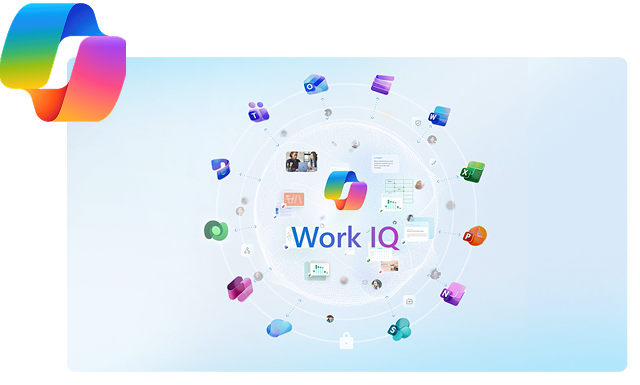
How Work IQ Helps you Succeed

This solution streamlines workflows, enhances decision-making, and boosts productivity across teams. It provides clear insights and actionable intelligence to optimize performance. Fully supported by Prodware, it ensures smooth implementation, ongoing guidance, and expert assistance to maximize value from day one.

Work IQ Powered by AI

Intelligent Automation

Leverage advanced analytics to anticipate outcomes. Work IQ identifies trends, risks, and opportunities before they happen, helping teams act proactively rather than reactively.

Contextual Assistance

Receive real-time, context-aware guidance. Work IQ understands your work environment and provides relevant tips, resources, and alerts precisely when you need them.

Collaborative Intelligence

Enhance team collaboration with AI support. Work IQ analyzes workflows, suggests optimal task allocation, and surfaces knowledge from across your organization to drive smarter teamwork.

Work IQ Powered by AI

Ready to Unlock the Full Power of Work IQ?

Prodware helps you design, deploy, and optimize Work IQ experiences — empowering your teams to work smarter, collaborate faster, and turn everyday workflows into measurable business impact.

Benefits

Accelerated Time-to-Value

Clients experience faster project completion and quicker adoption of solutions, enabling teams to achieve objectives sooner. Streamlined workflows reduce bottlenecks, letting stakeholders focus on strategic priorities instead of operational delays.

Reduced Operational Costs

By optimizing resource allocation and minimizing inefficiencies, clients can significantly lower ongoing expenses. This translates to leaner budgets without sacrificing quality, allowing businesses to reinvest savings into growth initiatives.

Seamless Scalability

Solutions grow with client needs, handling increasing workloads without performance loss. This flexibility ensures businesses can expand services, onboard new users, or enter new markets confidently, without costly system overhauls.

Enhanced Decision-Making

Real-time insights change how decisions get made — faster, sharper, and with full visibility across operations. The result: less risk, more opportunity, and outcomes that last.

Features

Intelligent Task Automation

Work IQ automates repetitive and manual workflows, allowing teams to focus on high-value tasks. By integrating with your existing systems, it can trigger actions based on predefined rules, prioritize tasks, and even suggest next steps. Its automation engine adapts to patterns over time, reducing errors and improving efficiency across operations while ensuring consistency in daily workflows.

Real-Time Analytics & Reporting

The solution provides comprehensive dashboards and live reporting, offering actionable insights into team performance and operational bottlenecks. Users can visualize trends, track KPIs, and generate reports on demand. Its analytics engine aggregates data from multiple sources, ensuring decisions are data-driven, transparent, and aligned with organizational goals.

Intelligent Routing & Assignment

Work IQ dynamically routes tasks, requests, and cases to the most appropriate team or individual based on skill, availability, and workload. This ensures optimal resource utilization and reduces resolution times. The system continuously learns from outcomes to refine routing logic, providing smarter, faster, and more accurate task assignments over time. 

Predictive Insights & Recommendations

Leveraging AI and machine learning, Work IQ predicts potential issues before they occur and offers actionable recommendations. From forecasting workloads to identifying process inefficiencies, the platform helps managers and employees make proactive decisions, reduce risks, and optimize performance. 

Seamless Integrations

Work IQ connects seamlessly with existing enterprise tools and systems, including CRM, ERP, communication platforms, and task management software. This integration ensures smooth data flow, reduces duplication, and provides a unified workspace where all team activities and insights converge. 

Compliance & Audit Management

The platform monitors workflows and data handling to ensure compliance with internal policies and industry regulations. It maintains detailed audit trails, automates compliance checks, and flags anomalies in real-time. This functionality supports both operational integrity and regulatory adherence without additional overhead. 

Industries Where we Deliver Excellence

Optimizing patient outcomes and operational efficiency – Our solution streamlines workflows, enhances data-driven decision-making, and ensures compliance across hospitals, clinics, and care networks. 

Healthcare

Driving productivity and reducing downtime – From production lines to supply chains, we help manufacturers anticipate bottlenecks, improve safety, and maximize throughput. 

Manufacturing

Enhancing customer experience and operational agility – We empower retailers with smarter inventory management, personalized engagement, and real-time performance insights.

Retail & E-Commerce

Securing operations while boosting efficiency – Banks, insurers, and fintechs leverage our platform to automate processes, manage risk, and gain actionable intelligence. 

Financial Services

Streamlining operations end-to-end – Optimize route planning, fleet management, and warehouse operations to reduce costs and improve delivery performance.

Logistics & Transportation

Driving sustainability and operational resilience – From smart grids to resource management, our solution supports predictive maintenance and data-driven decision-making. 

Energy & Utilities

Why choose Prodware?

As leaders in digital transformation, our approach as a trusted advisor for our clients helps you match disruptive technologies with business realities, to meet your challenges. We create AI-infused apps and deliver consulting and training services to answer your needs with competitive advantage and innovation in mind.

Have a project? Let's talk!

Tell us about your project and we’ll show you how Prodware can transform your business.

* Please select one of these options:

AI Workforce - Transform the Way Your People Work With AI

Empower your teams with AI copilots, digital labor, and smart workplace technologies that reduce manual workload, accelerate productivity, and unlock enterprise‑wide efficiency.
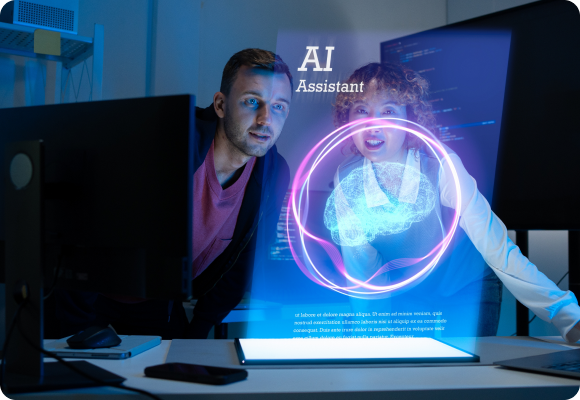
AI Workforce - Transform the Way Your People Work With AI
AI Workforce

What is AI Workforce?

AI Workforce is a modern work model where humans and AI operate together as teammates, supported by intelligent automation, copilots, and digital labor. It helps organizations shift from traditional information work to intelligence work – where tasks, decisions, and workflows are enhanced by AI-powered agents and tools.

Prodware supports businesses end-to-end in building their AI Workforce strategy: from data readiness and governance to deployment, adoption, and continuous improvement.

AI Workforce Powered by AI

AI‑driven workforce automates tasks, enhances productivity, and supports smarter decisions across workflows.
It combines automation, insights, and learning to streamline operations and improve outcomes.

Automated Task Execution

Automate repetitive tasks such as data entry, scheduling, and reporting. Reduce errors and free employees to focus on higher‑value work.

Smart Recommendations Engine

Deliver context‑aware recommendations based on data and user behaviour. Guide decisions with relevant, real‑time insights.

Predictive Insights & Analytics

Analyze data to identify trends and forecast outcomes. Enable proactive decisions and more confident planning.

AI Workforce Powered by AI

Ready to Build Your AI-Ready Workforce?

Prodware helps you deploy secure, scalable, and high-value AI solutions - from copilots to digital labor - to accelerate transformation.

Discover the Benefits of AI Workforce

Accelerated Productivity & Reduced Workload

Automate routine tasks with copilots and AI workflows. Free teams to focus on high‑value, strategic work.

Cost Efficiency & Operational Optimization

Reduce manual effort, errors, and process costs with AI automation. Drive efficiency and measurable ROI across operations.

Improved Decision‑Making with Intelligent Insights

Leverage real‑time insights and AI recommendations. Enable faster, smarter, data‑driven decisions.

Scalable Workforce Transformation

Scale operations with AI agents and low‑code tools. Support growth, hybrid teams, and continuous innovation.

Capabilities That Power your AI Workforce

AI Copilots Integrated Into Everyday Tools

AI copilots accelerate daily work by assisting with content creation, summaries, recommendations, and workflow execution across Microsoft 365 and Dynamics 365. Teams gain instant support wherever they work, reducing time spent on repetitive tasks and administrative processes.

  • Embedded in Microsoft 365 apps
  • Contextual insights and recommendations
  • Instant summarization & content generation

Autonomous and Semi‑Autonomous AI Agents

AI agents take on operational tasks, execute multi-step processes, and support employees as digital coworkers. They help reduce manual effort, handle routine operations, and improve consistency in decision‑making and execution.

  • Task execution with minimal human input
  • Cross-department process support
  • Configurable automation rules

Low-Code Automation and RPA Workflows

Low-code tools empower business users to automate processes without heavy development. Combined with RPA, organizations can rapidly digitize manual workflows and scale automation across departments.

  • Power Platform automation
  • RPA for repetitive tasks
  • Faster process digitization

Cross‑Application Orchestration for Complex Processes

AI Workforce connects tasks across multiple business systems - Microsoft 365, Dynamics 365, CRM, ERP, and custom apps - to create end‑to‑end automation that increases speed and reduces friction.

  • Multi‑system workflows
  • Streamlined approvals
  • Unified process execution

Employee Experience & Learning Insights Powered by AI

AI captures patterns, identifies skills gaps, and generates personalized recommendations for development. HR and leadership teams gain visibility into workforce needs to support continuous growth and adoption.

  • Skill mapping
  • Personalized learning paths
  • Employee experience analytics

Built‑In Governance, Compliance & Responsible AI Controls

AI Workforce is secure by design, with governance frameworks, permission controls, and oversight tools that protect data and ensure compliant AI usage across all teams.

  • Data access protection
  • Ethical and responsible AI rules
  • End‑to‑end auditing & monitoring

Where AI Workforce Creates Impact

AI Workforce applies to all industries where efficiency, automation, and intelligence-driven operations are critical. Organizations can accelerate transformation by enhancing productivity, improving workflows, and enabling digital labor.

Increase Operational Efficiency

AI automates production tasks, improves quality checks, and speeds up workflows to reduce delays and operational waste.

Connect your Supply Chain Teams

Copilots centralize information, enabling faster coordination across procurement, logistics, and operations.

Boost Productivity & Quality Control

Digital labor handles repetitive tasks, allowing teams to focus on process improvements and higher‑value decisions.

Manufacturing & Supply Chain

Increase Accuracy & Compliance

AI streamlines document analysis, risk checks, and regulatory workflows to reduce errors and strengthen compliance.

Connect Client & BackOffice Teams

Copilots unify insights and summaries so advisors, analysts, and operations stay aligned in real time.

Boost Productivity Across Processes

AI agents automate routine tasks like claims, reconciliation, and reporting, freeing teams for strategic work.

Financial Services & Banking

Increase Retail & Supply Efficiency

AI automates stock tasks, pricing updates, and merchandising workflows to keep operations fast and accurate.

Connect Teams Across Channels

Centralized AI insights help stores, warehouses, and customer teams coordinate smoothly across all touchpoints.

Boost Productivity & Customer Experience

Digital labor supports service tasks, product updates, and logistics, enabling more responsive and efficient customer interactions.

Retail, Distribution & E‑Commerce

FAQ

AI reduces manual tasks, accelerates workflows, and provides real‑time insights directly within everyday tools. This allows teams to work faster, make better decisions, and increase overall efficiency.

AI Workforce can automate repetitive and process‑driven tasks such as data entry, reporting, scheduling, approvals, and workflow routing, as well as support decision‑making and collaboration activities.

Yes. AI Workforce solutions are built with enterprise‑grade governance, security controls, and responsible AI frameworks, ensuring data protection, compliance, and controlled usage across the organization.

Successful adoption is driven through change management, role‑based training, and continuous support, ensuring employees understand, trust, and fully leverage AI capabilities in their daily work.

Why Prodware?

Prodware combines 30+ years of expertise in digital transformation with deep specialization in Microsoft technologies to help organizations build secure, scalable and high‑impact AI Workforce strategies. Our approach unites data readiness, automation, copilots, AI agents, governance, and employee adoption into one cohesive framework. With global delivery capabilities and proven methodology, Prodware ensures a smooth transition toward AI-powered work and tangible business value.

Have a project? Let's talk!

Tell us about your project and we’ll show you how Prodware can transform your business.

* Please select one of these options:

AI File Genie

Extract, structure and enrich your business document data to gain true value
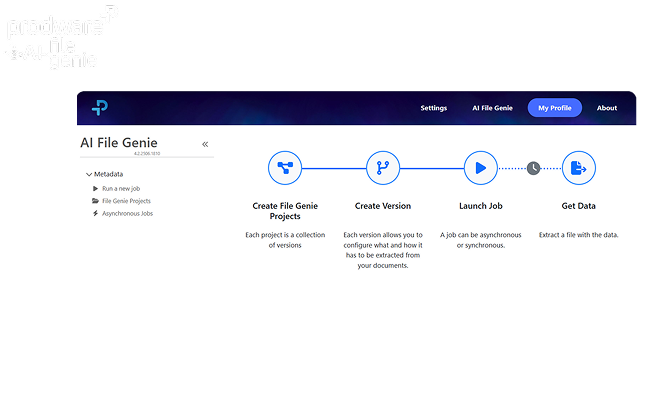
AI File Genie

How AI File Genie Can Help your Enterprise Succeed

Organizations often struggle with managing and extracting valuable information from unstructured documents. Manual processing is time-consuming and prone to errors, leading to inefficiencies and missed opportunities for data-driven decision-making.

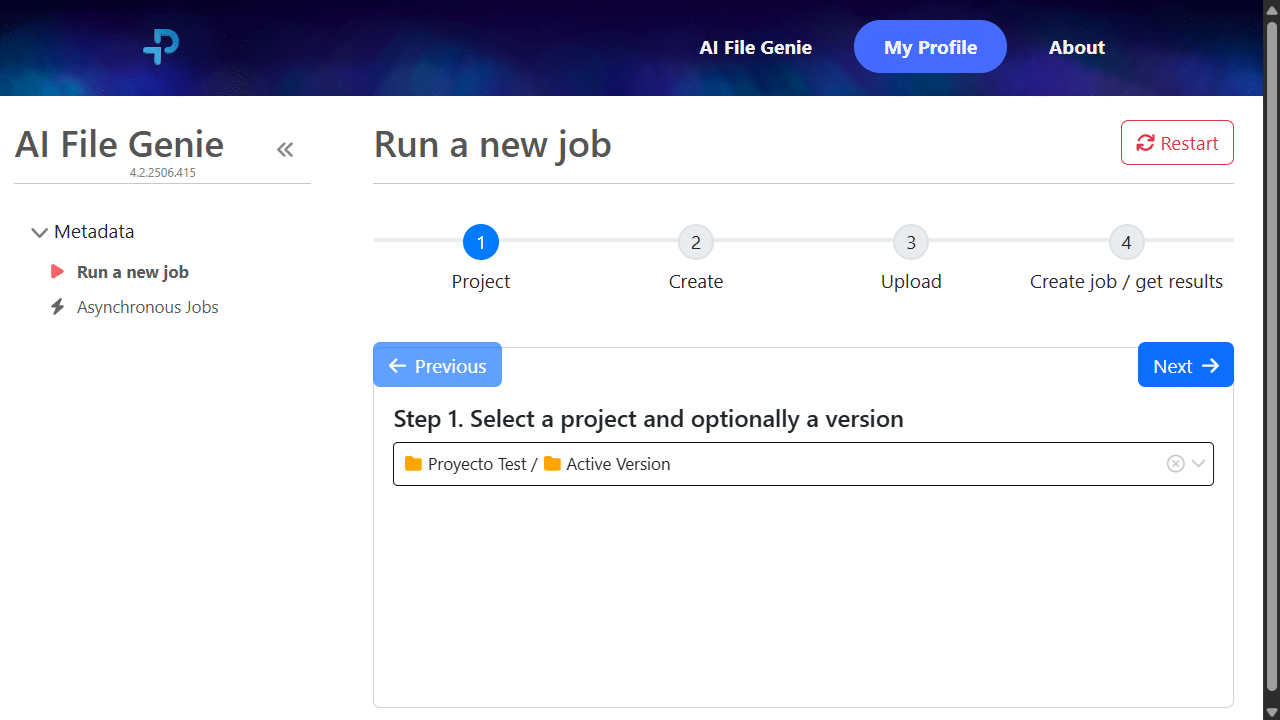
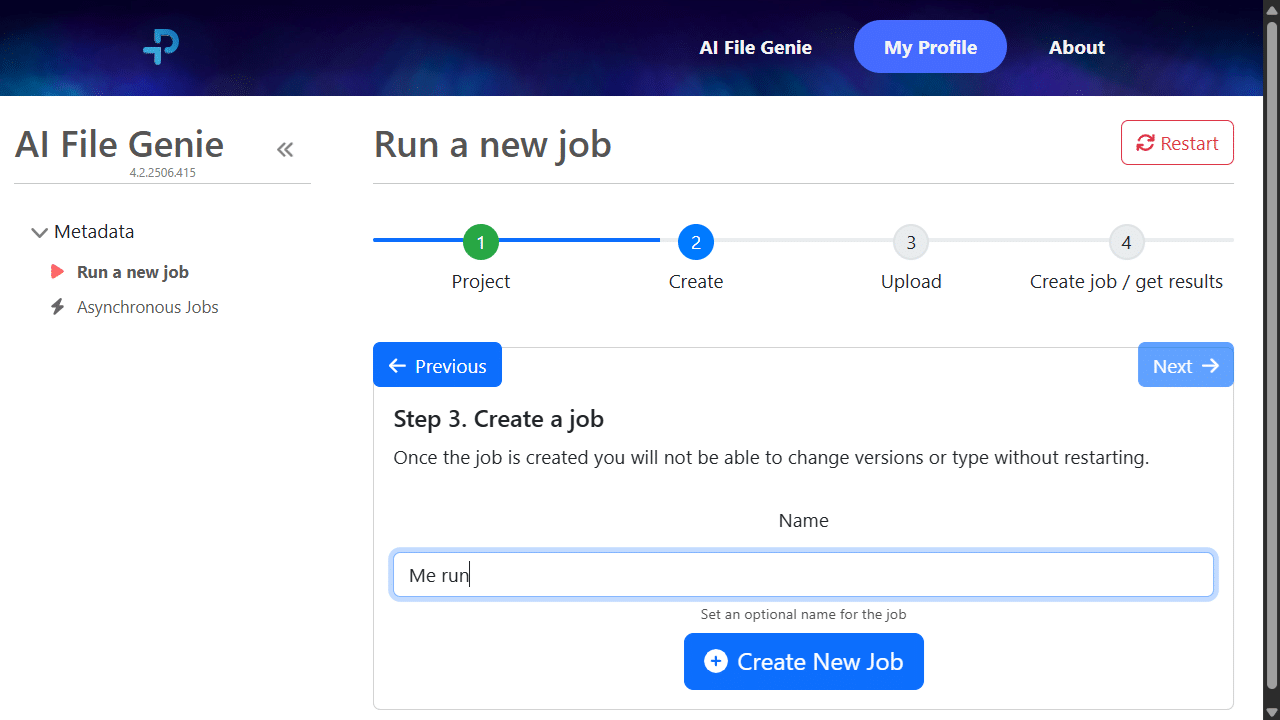
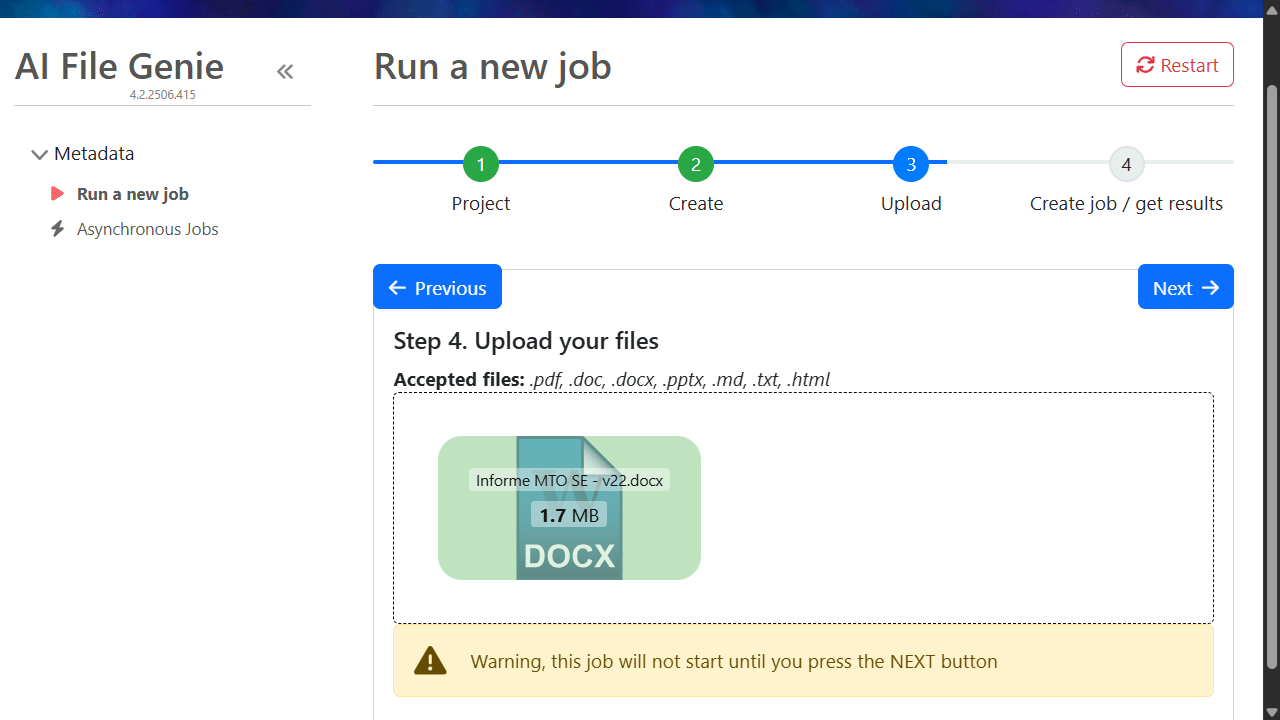
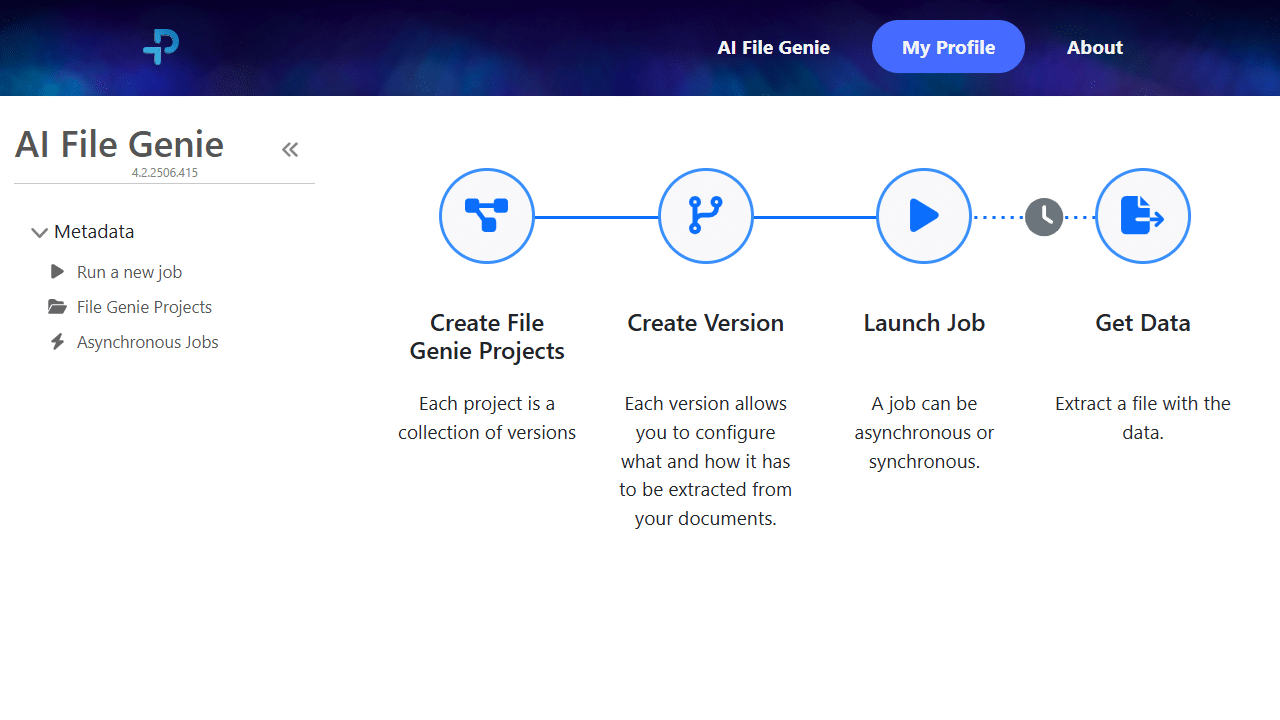
Prodware AI File Genie is a SaaS document intelligence tool that extracts information from unstructured data held within documents, helping to create structured outputs and enriching documents. It can be used on demand or as a one-time process, improving data quality, insights, and user adoption.

How is AI File Genie Used?

Efficient and Fast System Migrations

Transform unstructured source data by enriching and mapping it into new applications, improving insights, data quality, and user adoption throughout the digital transformation process.

Organize and Enrich Document Catalogs

Create an enriched document catalog by classifying and structuring semantic information from multiple sources to enhance document management.

Ongoing Document Extraction & Enrichment

Use AI File Genie for daily document search and processing to extract and enrich data to create better quality and centralized documentation.

Flexible SaaS Model

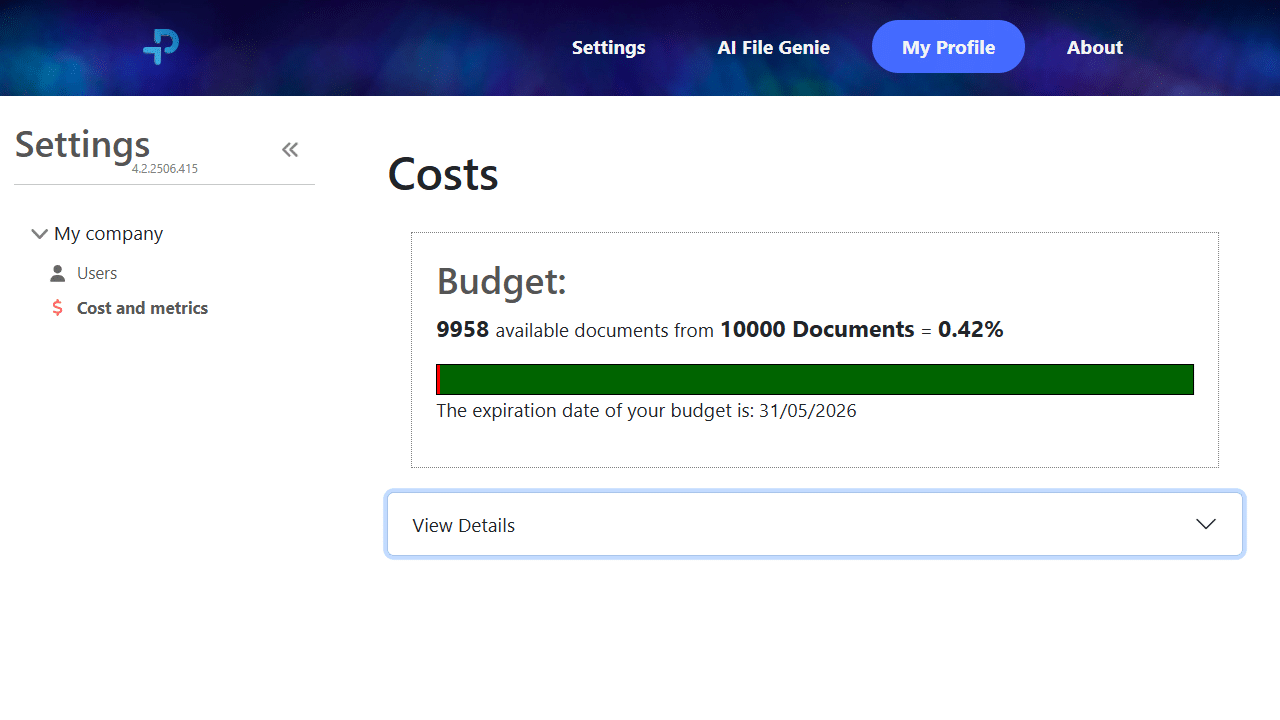
Prepaid, scalable monthly subscription pricing ensures cost predictability that suits your business needs. Users know the cost of the process before launching each project.


How is AI File Genie Used?

Turn Your Documents Into Structured, Usable Data

Ask Prodware how we can help your organization transform everyday workflows and access to insights.

Benefits of AI File Genie

Improved Team Productivity

By automating semantic search across multiple documents, AI File Genie saves time spent on manually searching for information, reviewing large documents or missing key data.

Enhanced Insights

AI File Genie speeds access to insights and decision-making by working with apps like Power BI to analyze extracted data from multiple sources for better visibility.

Automate On-demand Processes

Connect data extraction with Power Automate to maintain quality data outputs and surfacing key information as part of everyday workflows.

Features of AI File Genie

Rapid Document Intelligence

Instantly extract and enrich data from unstructured documents and export it as structured, enhanced data—whether as part of regular processes or on a one-off basis for specific projects.

User-Friendly Interface

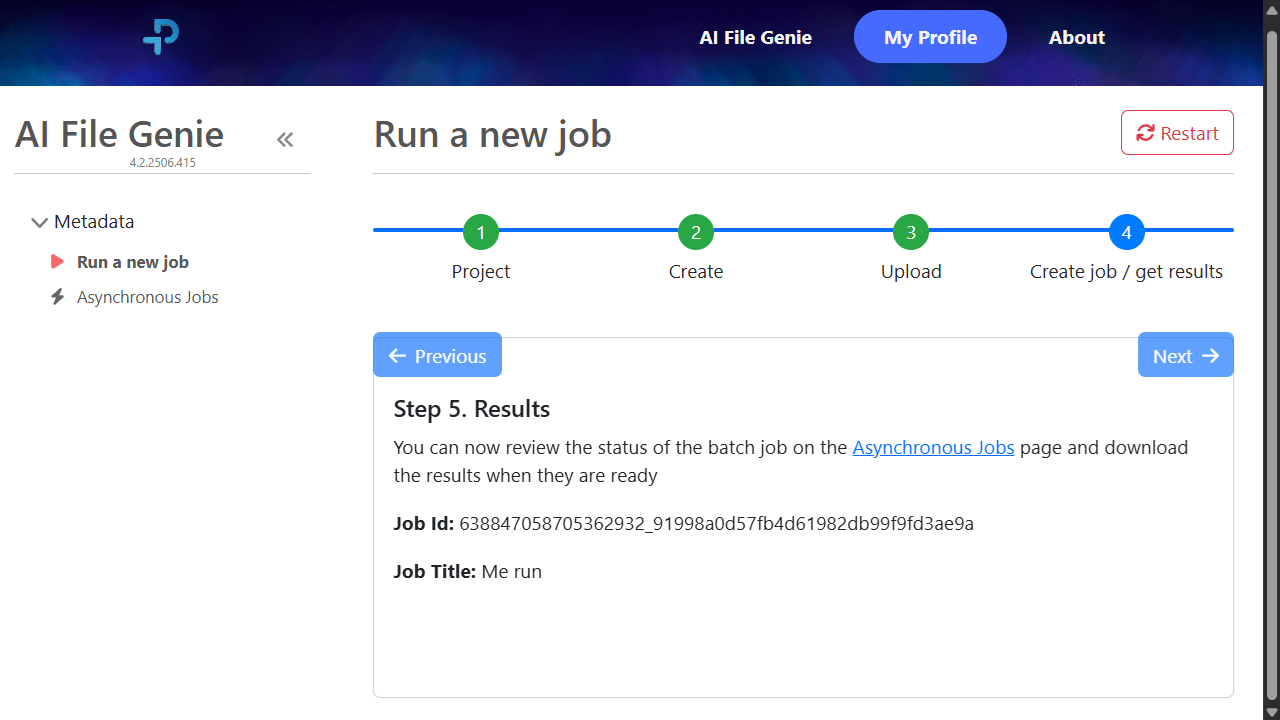
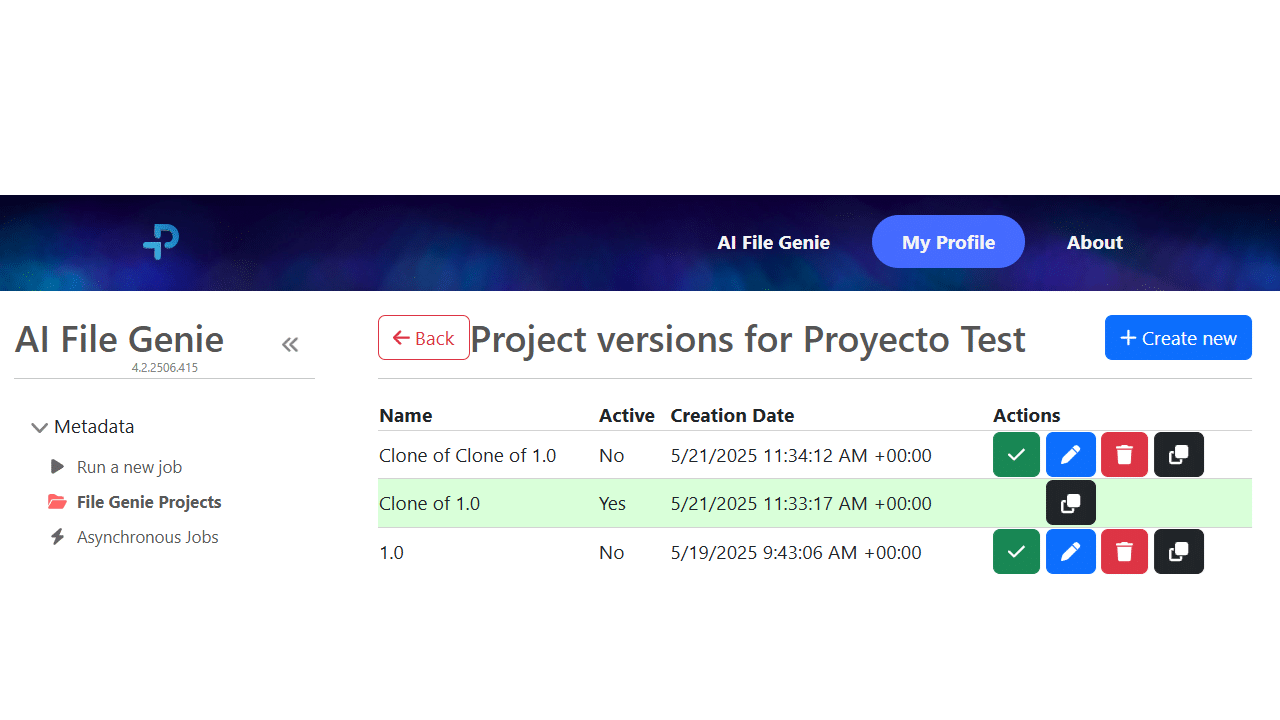
AI File Genie’s intuitive UI enables non-technical users to configure, launch and monitor processes with ease.

Full Process Traceability

Every step of each metadata extraction process is logged through to final results for verification, auditability and compliance checks.

Seamless Integrations

AI File Genie works with multiple tools via API, making it adaptable for migrations, cataloging and ongoing document enrichment.

Structured Document Management

AI File Genie can improve document management in tools such as Microsoft SharePoint to extract semantic information from documents, to enable complex searches, filters, views, column classifications etc.

Democratizing Data

AI File Genie focuses on surfacing key information contained within documents. It works with Microsoft Fabric to ensure structured data is accessible and usable for relevant users across the business.

AI File Genie is Helpful for...

  • Automated Document Management: Streamline file organization with AI that intelligently categorizes and tags documents.
  • Smart Insights: Gain actionable analytics on document usage, trends, and workflow bottlenecks.
  • AI Recommendations: Receive suggestions for file sharing, archiving, or collaboration based on usage patterns.
Enterprise & Corporate
  • Intelligent Search: Instantly locate contracts, case files, and compliance documents using natural language queries.
  • Risk Detection: AI flags inconsistencies, missing clauses, or potential compliance issues.
  • Workflow Automation: Automate repetitive tasks such as document review or approval tracking.
Legal & Compliance
  • Content Suggestions: AI recommends relevant assets or templates for campaigns and projects.
  • Version Control & Summaries: Automatically track edits and generate concise document summaries.
  • Collaboration Optimization: Suggests team assignments and priority files based on project progress.
Creative & Marketing
  • Research Assistance: AI identifies key insights, citations, and references across multiple documents.
  • Automated Note Generation: Summarizes lengthy papers or lectures into digestible notes.
  • Smart Recommendations: Suggests related materials, research paths, or learning modules.
Education & Research

FAQ

AI File Genie processes common business document formats (e.g., PDF, Word, and Excel) and extracts both metadata and business fields from unstructured or semi-structured content.

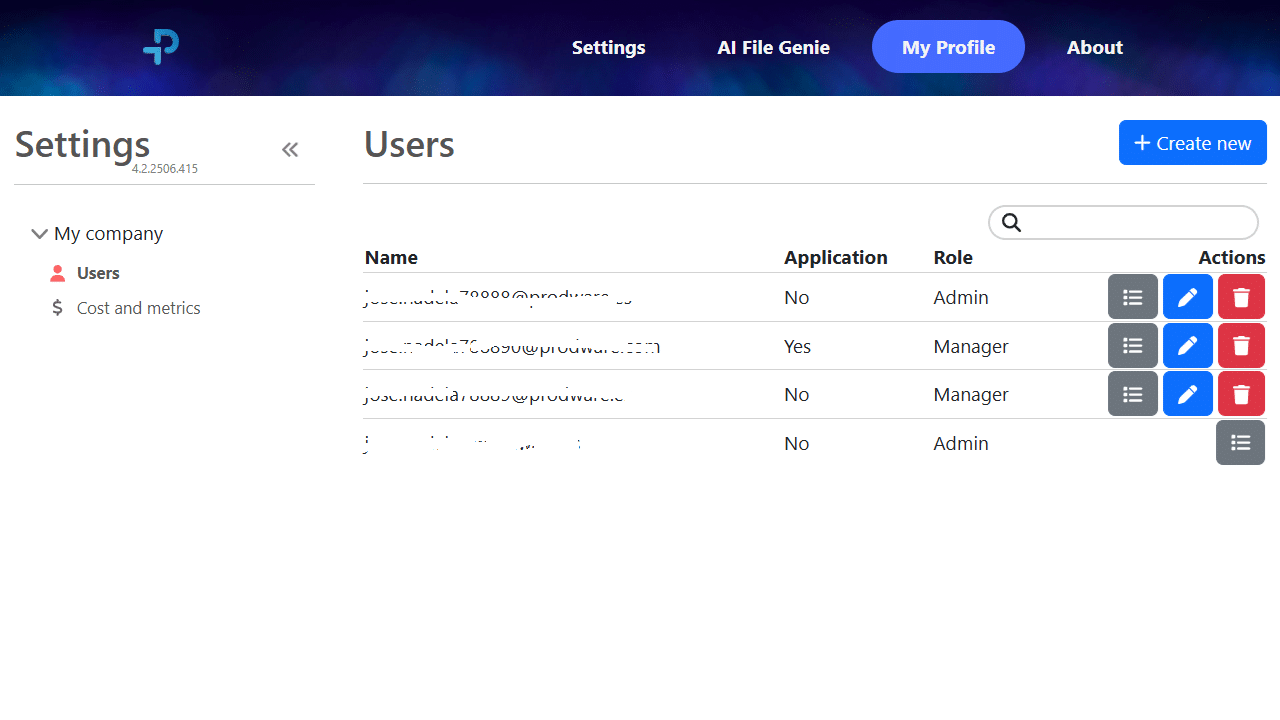
AI File Genie is designed for enterprise use cases where sensitive documents are processed. Access controls and process traceability support governance needs, and you can define what data is extracted and who can access the outputs (Deployment and security options can be aligned to your organization's requirements during scoping).

Outputs can be reviewed and validated using confidence signals and exception lists, so teams can focus human checks on the few items that need attention (instead of reviewing every page).

Many teams start with a focused proof of concept on a representative sample of documents to validate extraction scope and output structure, before scaling to larger volumes once mapping and validation rules are defined and agreed.

AI File Genie uses a prepaid, scalable SaaS subscription model, designed for cost predictability. Teams typically know the expected processing cost before launching a project.

ROI typically comes from reducing manual document handling, improving data quality for downstream systems (migrations, analytics, workflows), and speeding up access to the right information for decisions and customer responses.

Yes—each extraction run can be tracked end-to-end, with logged steps and outputs that support verification, auditability, and compliance checks.

Both. It can be used for one-time initiatives (e.g., system migrations or backlog clean-up) and for recurring processes where new documents arrive daily and need extraction/enrichment.

Why choose Prodware?

As leaders in digital transformation, our approach as a trusted advisor for our clients helps you match disruptive technologies with business realities, to meet your challenges. We create AI-infused apps and solutions to answer your needs with competitive advantage and innovation in mind.

Have a project? Let's talk!

Tell us about your project and we’ll show you how Prodware can transform your business.

* Please select one of these options:

Copilot Chat

Your ideas, accelerated.

Copilot Chat

How does Copilot Chat Help You Succeed Today?

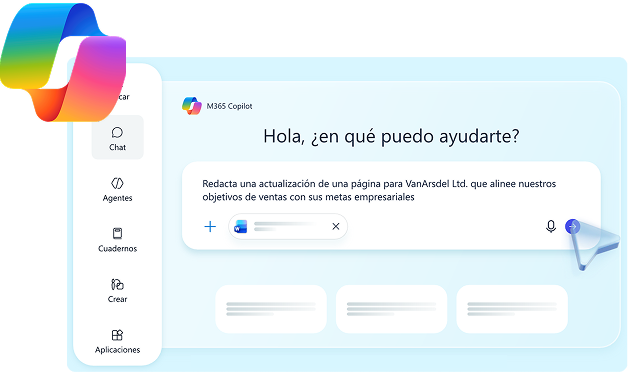
Copilot Chat is the free AI entry point for Microsoft 365 users, enabling generative AI in everyday work. It helps people draft emails, summarize documents, brainstorm ideas, and automate routine tasks directly within familiar apps. With natural language prompts, users can ask questions, generate content, and get actionable insights faster, improving productivity, collaboration, and decision-making across teams while maintaining security and compliance standards. 

Copilot Chat Powered by AI

Copilot Chat uses AI to automate tasks, surface insights, and deliver contextual guidance that enhances productivity.

AI-Powered Automation

Automates routine processes and repetitive work, helping teams complete tasks faster while maintaining oversight.

Smart Recommendations

Uses behavioral patterns and operational data to provide relevant suggestions that improve efficiency and accuracy.

Intelligent Insights

Analyzes data in real time to uncover trends, anomalies, and opportunities that support informed decision-making.

Context-Aware Assistance

Delivers personalized guidance based on user intent and workflow context, improving productivity and user experience.

Copilot Chat Powered by AI

Ready to Unlock the Full Power of Copilot Chat?

Prodware helps you design, deploy, and optimize Copilot Chat experiences — enabling your teams to work smarter, collaborate faster, and turn everyday conversations into measurable business impact.

Benefits

Increased Productivity

Reduces manual effort and streamlines daily operations, allowing teams to focus on higher-value strategic work.

Faster Decision-Making

Provides timely insights and recommendations that help users respond quickly and confidently to business needs.

Enhanced Scalability

Supports growing workloads without increasing complexity, enabling teams to operate efficiently at scale.

Improved Operational Confidence

Strengthens governance and risk management with intelligent safeguards that promote secure, compliant workflows.

Features

No Training on Your Data

Ensures that prompts and responses are never used to train or improve AI models. This guarantees that your sensitive or proprietary information remains private and isn’t incorporated into broader datasets, providing strong data confidentiality while interacting with the system. 

Contractual Protection

Includes comprehensive coverage through a Data Protection Addendum (DPA) and the Product Terms. This framework formalizes data handling responsibilities, ensuring compliance with contractual obligations and giving organizations legal assurance that their information is managed securely. 

GDPR Compliance and Data Residency

Supports full compliance with GDPR requirements, offering hosting in your chosen region if needed. This ensures that data storage and processing meet local privacy laws, helping organizations maintain regulatory adherence and control over where their data resides.

Built-in IT Controls

Provides integrated permissions, audit trails, retention policies, and labeling features. These controls allow IT teams to manage access, monitor activity, enforce organizational policies, and maintain visibility over sensitive data, simplifying governance and operational security.

Industry Where we Deliver Excellence

Streamline patient care and administrative workflows – Copilot Chat helps healthcare providers quickly access patient information, automate routine documentation, and support clinical decision-making. 

Healthcare

Enhance accuracy and efficiency in financial operations – From real-time data insights to report generation, Copilot Chat empowers banking, accounting, and investment teams to reduce errors and save time. 

Finance

Boost customer engagement and operational efficiency – Assist teams with inventory management, personalized marketing, and customer support, helping retailers deliver faster and smarter experiences. 

Retail & E-Commerce

Accelerate development and support workflows – Copilot Chat supports coding assistance, documentation, and internal knowledge management, enabling tech teams to innovate faster. 

Technology & SaaS

Optimize production and supply chain operations – Automate repetitive tasks, track workflows, and streamline communication across teams for higher productivity. 

Manufacturing & Logistics

Empower teaching and learning experiences – Facilitate content creation, research support, and administrative efficiency for educators, administrators, and students. 

Education

FAQ

Copilot Chat is an AI-powered assistant that helps you write, summarize, brainstorm, and code more efficiently by providing real-time suggestions and conversational support.

You can type or speak your questions or tasks directly in the chat. Copilot responds with relevant answers, code suggestions, explanations, and ideas tailored to your request.

Yes, Copilot Chat is designed with privacy and security in mind. User inputs are processed solely to generate responses, and all data handling follows the platform’s security, privacy, and compliance policies. 

Why choose Prodware?

As leaders in digital transformation, our approach as a trusted advisor for our clients helps you match disruptive technologies with business realities, to meet your challenges. We create AI-infused apps and deliver consulting and training services to answer your needs with competitive advantage and innovation in mind.

Have a project? Let's talk!

Tell us about your project and we’ll show you how Prodware can transform your business.

* Please select one of these options: