AI User Insights

Surface insights into how your business applications are used to drive productivity, adoption, and ROI

AI User Insights

How AI User Insights Drives Enterprise Success

The benefits from implementing leading business applications such as Microsoft Dynamics 365 is how employees adopt and use the functionalities to improve daily processes, productivity and efficiency.

But how can you gain insights into how employees are using business tools and how these applications align with business processes?

At any stage of an IT project—from scoping and migration to pilots, proofs of concept, and rollouts—user behavior is a key factor in your analysis to understand priorities, ROI, and training needs.

How Does AI User Insights Support IT and Process Optimization?

AI User Insights integrates with Dynamics 365 to track user activity aligned with workflows, providing interactive dashboards and reports.

Detect Unusual User Behavior Patterns

Outliers and Anomalies can signal potential issues or improvement opportunities.

Detect Trends And Usage Patterns

Visualizations and metrics to identify trends, serving as benchmarks for process improvement and automation.

Personalize User Experience

Admins can give tailored recommendations to each user based on usage trends, enhancing productivity and user satisfaction.

Enhance Application Development

Reveal pain points, feature preferences, and usage patterns. Businesses can prioritize enhancements and drive effective innovation.

How Does AI User Insights Support IT and Process Optimization?

Turn User Behavior Into Actionable Insights

Ask Prodware how we can help unlock intelligence with AI to improve business processes and technology adoption.

Benefits of AI User Insights

Improve User Adoption And ROI

Understand how employees use apps to improve adoption and ROI by tailoring support, training, and recommendations to real behavior patterns.

Optimize Business Processes With Data Driven Insights

Identify bottlenecks, inefficiencies, and improvement opportunities using real usage data, and detect anomalies, drop-offs, and outliers early—before they impact performance.

Accessible Without Coding

AI User Insights unlocks hidden intelligence within Dynamics 365 data, delivering actionable insights without requiring technical skills and supporting any organization’s data-driven transformation.

Fully Integrated and Ready

Works out-of-the-box and integrated in Dynamics 365 ERP (Business Central, Finance & Supply Chain Management) and Dynamics Customer Engagement (CRM) apps.

Features of AI User Insights

Menu & Configuration

Set up your environments, applications, users, forms, items, tasks, and dynamic filters for reporting.

Paths

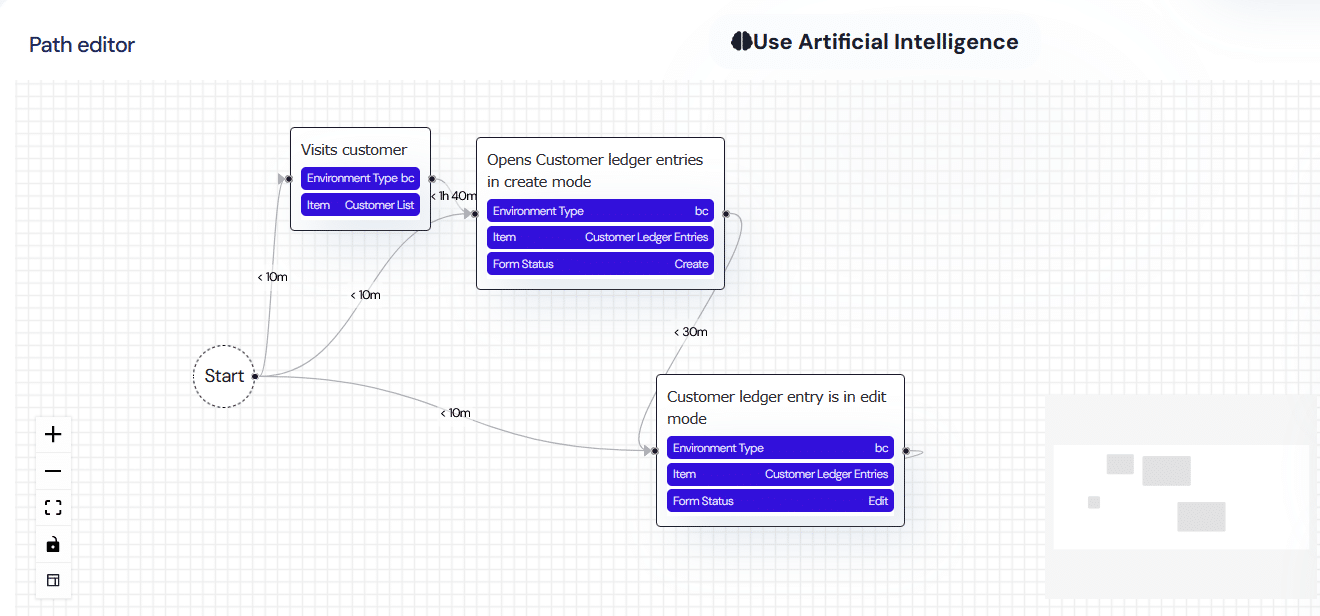
Paths define a sequence of events or actions to be executed in a defined order within a maximum time frame, aligned with productivity and process targets. Users can build them via drag-and-drop or let AI generate them from natural language prompts.

Global View

Your Home screen provides an overview of KPIs and global usage reports across all applications within your environment.

Time Series

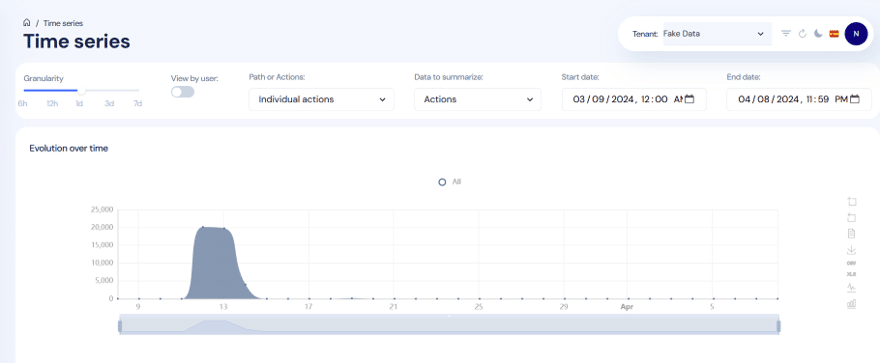
A report showing the evolution of user activity data over time, with adjustable time periods, intervals, and path types, enabling analysis by volume, frequency, and user.

Adoption and Recurrence

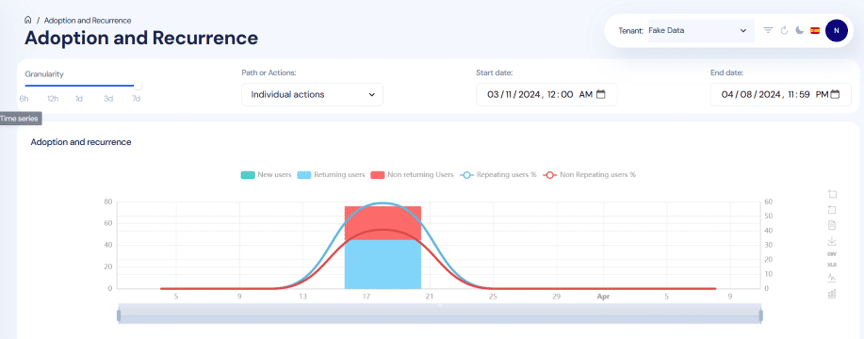
Admins can analyze adoption speed and repetitive behaviors for new actions or paths over a defined time period, segmented by new, returning, and non-returning users.

Path Funnel

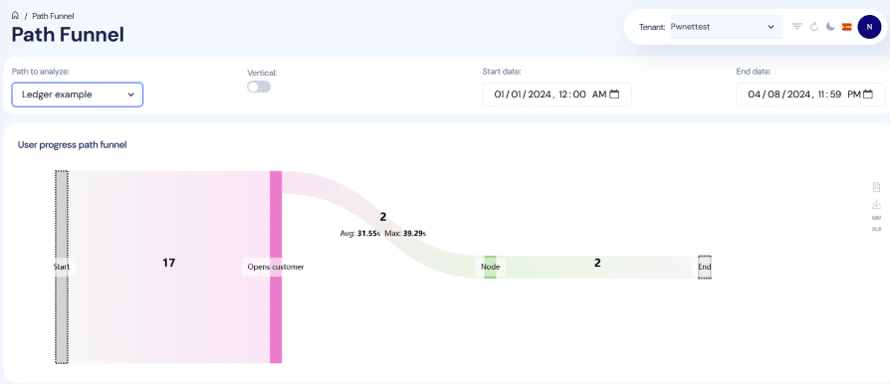
A report to show insights on each path to optimize business processes. You can view the number of users passing through each point, time spent (average and maximum).

User Activity

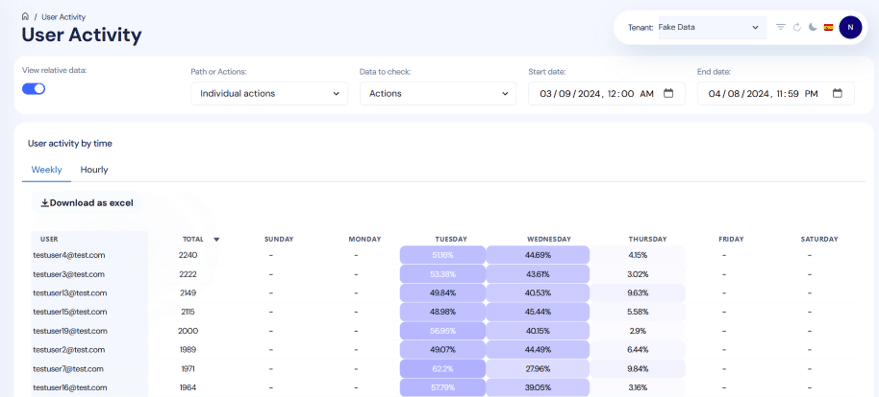
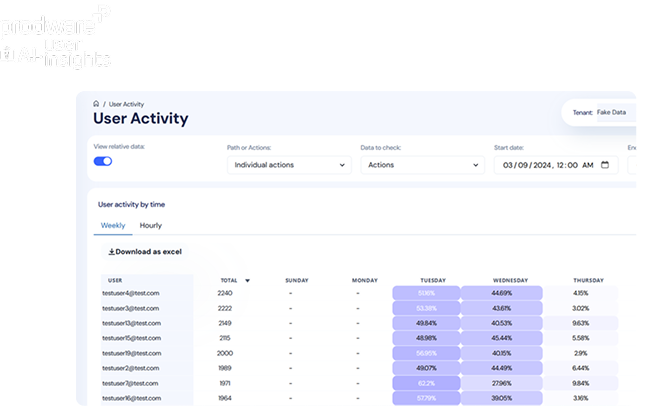
This analysis shows individual user activity over time (by hour, day, or week), helping identify periods of higher activity globally and by path. This insight highlights usage trends and outliers.

Duration Histogram

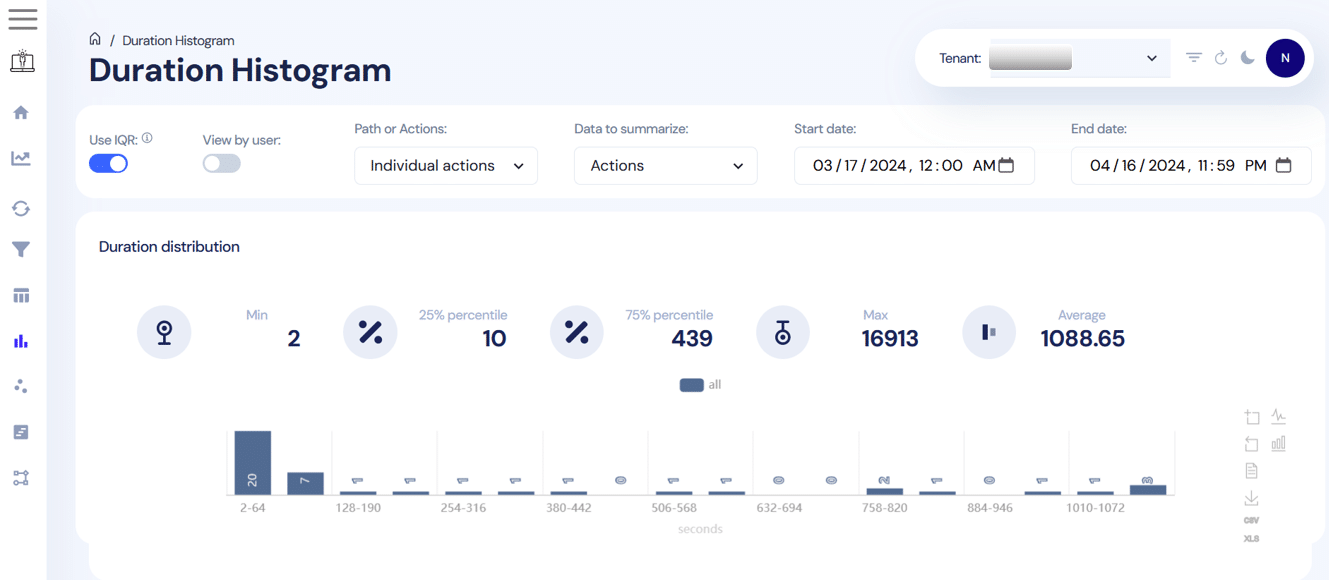
A time-based report showing the time spent by users on different actions or paths, broken down by volume and percentage. This enables managers to identify efficiency levels and productivity patterns within workflows.

User Clustering

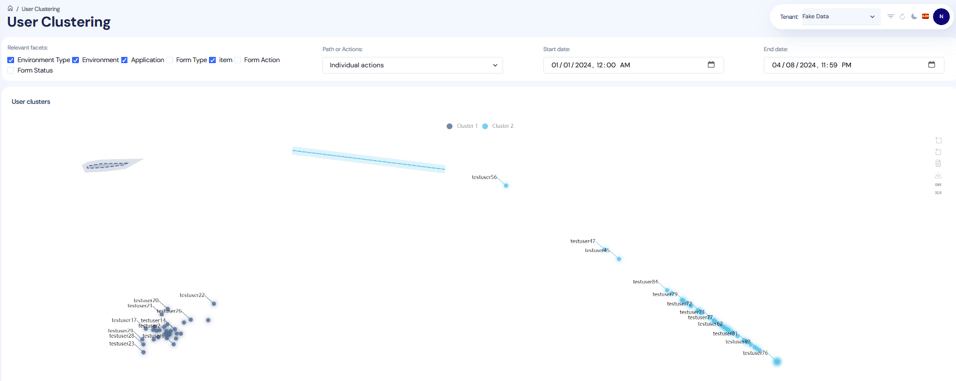
Clustering enables you to identify overall user behavior patterns and compare differences across actions and processes, helping to detect common issues at the user, process, or task level.

User Timeline

Displays each action in a user’s activity history to understand individual behavior and identify specific training or support needs.

Secure And Flexible

Admins control access at the tenant, application, and user levels. All data is encrypted and complies with Azure privacy standards. No user profiling is performed.

AI User Insights is Helpful for...

  • Improve case-handling process compliance. Define the expected service workflow as a Path and use path insights to identify where agents deviate or slow down—so you can target coaching and streamline steps.
  • Detect unusual handling patterns that signal quality or training issues. Use outliers and anomalies detection plus usage trends/outliers reports to spot atypical behavior enabling earlier intervention and more consistent service execution.
  • Reduce resolution time by pinpointing workflow inefficiencies. Use the time-based reports to identify which actions consume the most time and benchmark improvements after process changes or automation.
Customer Services
  • Target training during HR system rollouts. Use adoption speed and recurrence analysis to identify teams struggling with new HR workflows and focus enablement where adoption is lagging.
  • Identify where employees get “stuck” in HR self-service workflows. Define HR workflows as Paths and analyze each step to locate the exact steps causing friction, so HR can simplify guidance or adjust the process.
  • Personalize HR app guidance without profiling. Use the capability for admins to provide tailored recommendations based on usage trends to help different employee groups complete HR tasks more smoothly.
Human Resources
  • Create process benchmarks and spot improvement opportunities. Use visualizations and metrics to detect trends and usage patterns as baselines, then track changes over time using time evolution reports to quantify improvements after changes to workflows or automation.
  • Segment users by behavior to explain performance variation. Use user clustering to identify groups following different paths or struggling with specific tasks—supporting root-cause analysis and targeted change management.
  • Deep-dive into individual user journeys for evidence-based recommendations. Use user timeline/activity history and time-slot activity patterns to understand how work is actually performed and recommend process or UI changes grounded in observed behavior.
Business Analysts
  • Standardize campaign execution workflows. Define the workflow as a Path and use path insights to spot where marketers diverge from the intended process—improving consistency and reducing rework.
  • Increase adoption after new marketing features or rollouts. Use Adoption & Recurrence to see whether teams are actually using new capabilities after a pilot or rollout—so enablement can focus on groups with slow adoption.
  • Find bottlenecks in day-to-day marketing operations. Use time evolution reports and duration/time spent by action/path to benchmark how long key tasks take and identify steps that are slowing productivity for targeted process simplification or automation.
Marketing
  • Improve CRM process compliance. Model the desired sales motion as a path and analyze the funnel and step timing to identify where reps drop steps (e.g., missing qualification actions) or spend too much time, enabling targeted coaching and streamlined workflows.
  • Identify unusual rep behavior that may indicate risk or inefficiency. Use outliers/anomalies and usage trend/outlier insights to flag atypical patterns enabling earlier support and improved sales hygiene.
  • Segment rep behaviors to tailor enablement. Use user clustering to group reps by behavioral patterns across actions/processes, then use user timeline/activity history to validate where each cluster struggles—so training and sales playbooks can be personalized based on observed usage trends.
Sales
  • Optimize month-end close / period-end workflows. Define the finance close sequence as a Path and review path insights to locate bottlenecks and long-duration steps—supporting process improvements and more predictable close cycles.
  • Detect compliance or control exceptions in finance processes. Use outliers and anomalies plus time-based reports to spot unusual user behavior patterns around critical ERP actions, surfacing potential issues and improvement opportunities.
  • Drive adoption and reduce training gaps post-implementation. Use adoption speed and recurrence reporting to track which finance teams are engaging with new workflows after pilots/rollouts and use user activity timelines to pinpoint individuals or groups who need targeted support.
Finance
  • Improve adherence to warehouse execution processes (receive → put-away → pick → pack/ship). Configure warehouse workflows as Paths and analyze path funnel + step timing to identify where operators deviate or stall, supporting process refinement and targeted training to improve throughput.
  • Spot productivity issues and abnormal usage patterns. Use duration/time spent reports and outliers/anomalies to surface unusual behavior or long task durations that may indicate confusion, poor UI fit, or process issues—enabling faster corrective action.
  • Benchmark improvements after automation or device/process changes. Use trend metrics and time evolution reporting as benchmarks, then compare pre/post changes to validate whether new warehouse processes reduce time-on-task and increase consistent usage patterns.
Supply Chain

FAQ

AI User Insights tracks real user behavior across Dynamics 365 to reveal adoption levels, process compliance, productivity trends, and training needs—helping leaders clearly link software usage to business ROI.

The solution identifies bottlenecks, outliers, and inefficiencies using AI-driven paths, metrics, and visualizations, enabling leaders to prioritize process improvements and automation initiatives.

AI User Insights is an AI-powered platform integrated with Microsoft Dynamics 365 that automatically records in-app user activities and transforms them into easy-to-read reports and dashboards.

No. Users can explore insights through intuitive dashboards, drag-and-drop reporting, or natural language prompts powered by Large Language Models (LLMs).

By analyzing usage patterns and time spent on tasks, AI User Insights highlights faster paths, common issues, and best practices—helping users work more efficiently within Dynamics 365.

Why choose Prodware?

As leaders in digital transformation, our approach as a trusted advisor for our clients helps you match disruptive technologies with business realities, to meet your challenges. We create AI-infused apps and solutions to answer your needs with competitive advantage and innovation in mind.

Have a project? Let's talk!

Tell us about your project and we’ll show you how Prodware can transform your business.

* Please select one of these options: